

Your AI Has Multiple Personalities
A practical guide to model personalities and choosing the right tool every time

Choosing an AI model isn’t about loyalty, it’s about clarity.
Every model has a personality, a set of strengths, and a sweet spot where it shines.
If you know those traits, picking the right tool becomes obvious. If you don’t, everything feels like guesswork.
Most creators aren’t struggling because AI is complicated.
They’re struggling because they’re forcing one model to do every job.
I know how it is. You get loyal to Midjourney, or Flux, or whatever tool you imprinted on first. You’ve spent weeks building prompts, learning quirks, figuring out what works. Switching feels like throwing that investment away.
But that loyalty is holding you back. You wouldn’t hire the same person to design your logo, edit your podcast, and manage your finances. Different jobs need different specialists.
Try asking Midjourney for photorealistic product shots. You’re fighting its personality. It’s stylized and artistic. Flux, on the other hand, is built for realism. Same prompt, totally different personality, totally different output.
The creators getting the best results aren’t loyal, they’re strategic. They pick models based on strengths, not habit. Once you understand how these tools behave, choosing the right one is no different than hiring the right specialist for the job.
I got the chance to talk with Katelyn Chedraoui CNET this week about this exact thing: AI model personalities and why smart creators treat tools like a team, not a committed relationship.
This isn’t about which tool is “better.” It’s about which tool is right for the job.
Here’s the breakdown: model personalities, how to pick the right tool, and when multi-model workflows make sense.
TL;DR
Every AI model has a personality. Stop forcing one model to do everything.
Pick models based on traits (realism, consistency, style, safety) not loyalty.
Multi-model workflows win when you need mixed strengths in one project.
You don’t need to “master AI.” You need a clear vision, strong examples, and a simple system for choosing the right tool.
The Personality Factor
The creators getting the best results are tool-agnostic and goal-focused.
Creators talk about image and video models like they have distinct personalities. And it’s accurate. These models were trained differently, on different datasets, so they excel at different things. This isn’t a marketing claim or subjective preference - it’s just how training data works.
Community reputation matters too. Once Nano Banana became known as the consistency tool, that’s how everyone started using it. Creators are humanizing these tools - they call them “reliable” or “the creative one” - because they’re actually building relationships with their AI. These personalities help creators build trust, work through creative blocks, and find workflow comfort. When you know Flux nails realism every time, that reliability removes decision paralysis.
Your Model Selection Guide
Here’s the simplified version of how I think about the major models right now. This will evolve (new models drop constantly), but the framework for evaluating them stays the same.
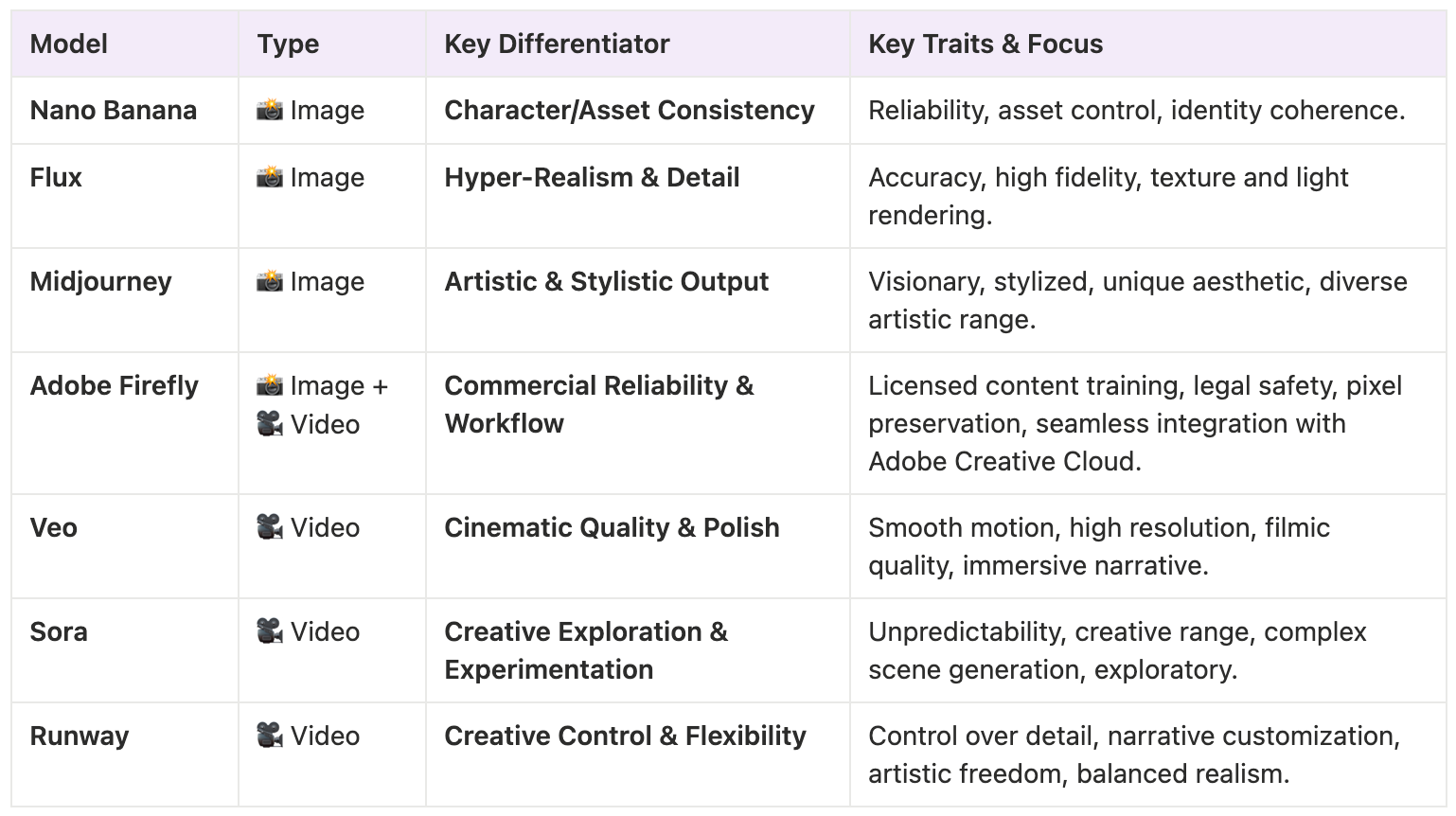
Every model decision comes down to three things:
What are you making? (the goal)
What matters most? (realism, consistency, style, speed, safety)
Which model specializes in that trait? (the match)
For image models, the personalities break down like this:
Nano Banana is the dependable workhorse. Use it for product images or when you need the same character showing up consistently across multiple shots.
Flux is known for realism, especially faces. If you need a human to actually look human and you want it detailed and lifelike, that’s where you go.
Midjourney is the artistic one. Use it when you want something stylized, visually interesting, or when you’re trying to make something that doesn’t look like everything else on the internet.
Adobe Firefly is built for commercial work. It’s trained on licensed content so you can use outputs in client work without licensing issues. It blends commercial reliability with direct integration into professional design workflows.
For video models, the personalities are even more distinct:
Veo is the cinematic artist. High quality, natural motion, immersive storytelling. Use it when you want that polished, professional feel.
Sora is the creative explorer. Use it when you’re experimenting and figuring out what you want, not when you need something ready to publish.
Runway is like having a creative studio. It balances artistic freedom with realism, gives you control over details and lets you customize the narrative and cinematic elements.
No single model does everything well. Creators use multiple tools and pick the right one for each job.
How to Actually Choose Which Model to Use
The biggest factor: what you’re actually trying to create.
When you know exactly what you want to create, it becomes really obvious when you’re using the wrong tool for the job.
Image Models:
For consistency work, like building a character across multiple images or creating product shots, Nano Banana preserves accuracy shot after shot. Flux also handles consistency well while keeping that realistic, lifelike quality.
→ If consistency matters, generate 3–5 variants and see if the character holds.
For realistic human faces, Flux is unmatched. Use it when you need portraits or people in your visuals and you want them to look like actual human beings, not uncanny valley.
→ If realism matters, check hands, eyes, reflections.
For product images and quick social content, Nano Banana is the workhorse. Fast, accurate, creates brand-ready assets without a lot of back and forth.
→ If you’re unsure, generate the same prompt in two models and compare.
For artistic or stylized work, Midjourney. When you want something visually stunning, abstract, or creatively unique.
Video Models:
For cinematic video, Veo delivers that high-quality storytelling feel when you want something polished and immersive.
For video exploration and ideation, Sora is better when you’re still in the experimental phase and figuring out concepts.
For controlled, customized video, Runway when you want to balance artistic freedom with realism and customize every cinematic detail.
Use this prompt to instantly pick the right AI model for any task:
Here’s what I’m trying to create: [describe the result].
Here are 3 example images/videos I like: [upload or link].
Rank the best AI models for this task and explain why each one fits or doesn’t. Then draft a starting prompt optimized for the recommended model.
So if you’re struggling to get Midjourney to create realistic product photos, that’s not a Midjourney problem… That’s a model mismatch.
Stop Blaming the Model and Start Speaking Its Language
The mistake creators make is they blame the model when they haven’t learned how to describe what they want.
So how do you get started? Here’s the real move: drop a screenshot into ChatGPT and ask, “How would you write a prompt to generate an image in this style?”
Let the model reverse-engineer the vocabulary for you.
Prompting is a skill, but it’s not mystical. Start by working backward from examples. The more you deconstruct, the faster you build the language you need for image and video tools.
If you don’t give AI your own examples and constraints when you’re prompting these tools, you end up with generic outputs that look like everything else.
Quick exercise:
Drop three images you like into ChatGPT and ask it to extract the style language. Then reuse that style across Nano Banana, Flux, and Midjourney to see how each interprets it. You’ll immediately see their personalities.
When Using Multiple Models Makes Sense
There’s a huge benefit to multi-model workflows, but only if you’re actually building something that needs it.
If you’re creating something simple - a social media header, a single product shot - one tool is fine. You don’t need a complex workflow for straightforward tasks.
But when you’re building something more substantial, using multiple models just makes sense.
Real workflow examples: Use Nano Banana to generate consistent character images (because it’s the best at maintaining accuracy across multiple shots), then take those images and use Veo or Sora to animate them. You’re using each tool for what it does best.
Or create artwork in Midjourney when you want something stylized and unique, then use Nano Banana or Adobe Firefly to mock it up onto product photos or marketing materials.
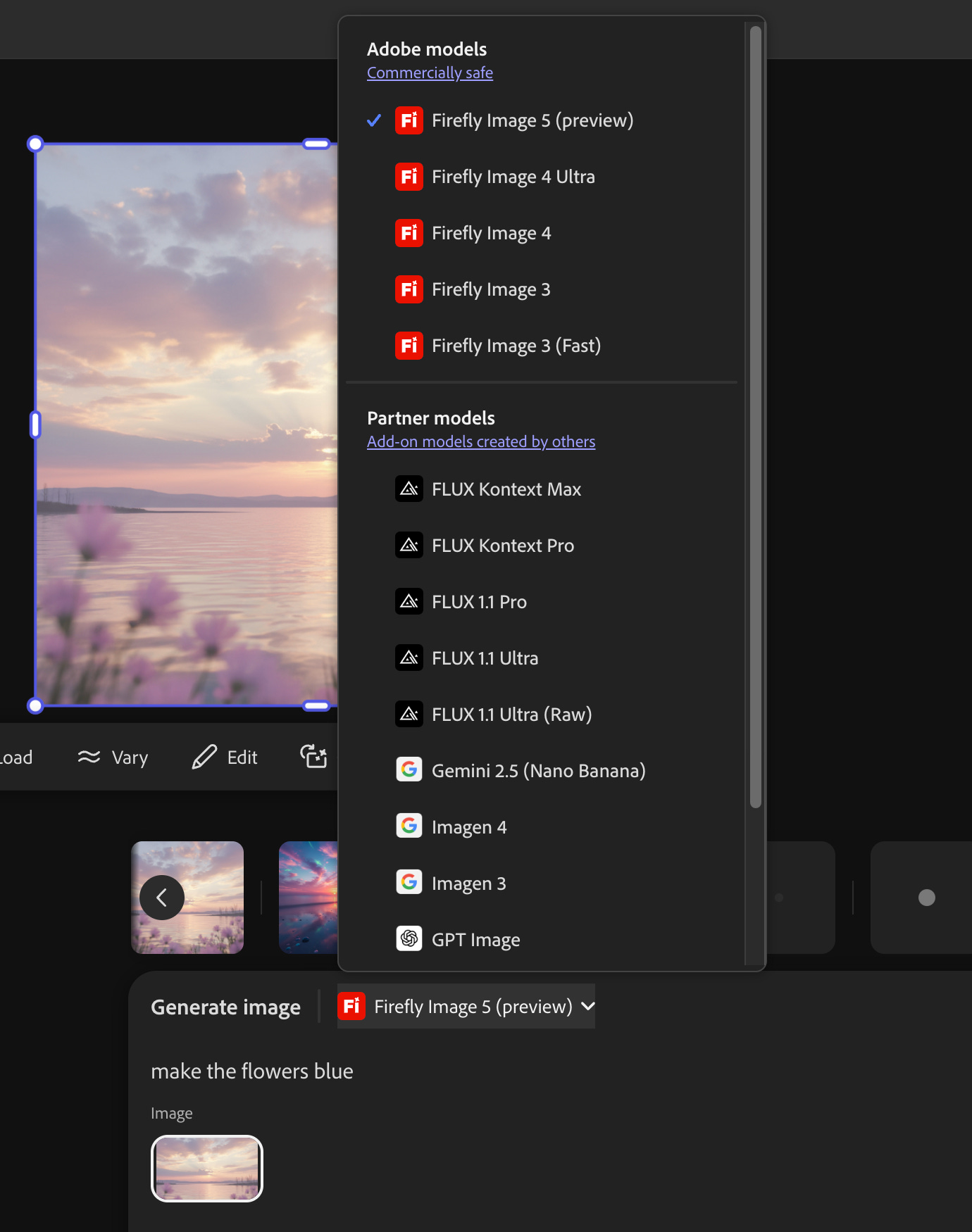
If you’re regularly generating images or videos, Adobe Firefly gives you one interface that actually connects all the models: Adobe’s Firefly Image, Nano Banana, Flux, GPT Image, and more.
So you’re not bouncing between apps or reloading your context every time you switch tools. You stay in the same workspace, swap models instantly, and keep your momentum.
When you’re moving fast, staying in one workspace isn’t just a luxury, it’s the whole cheat code.
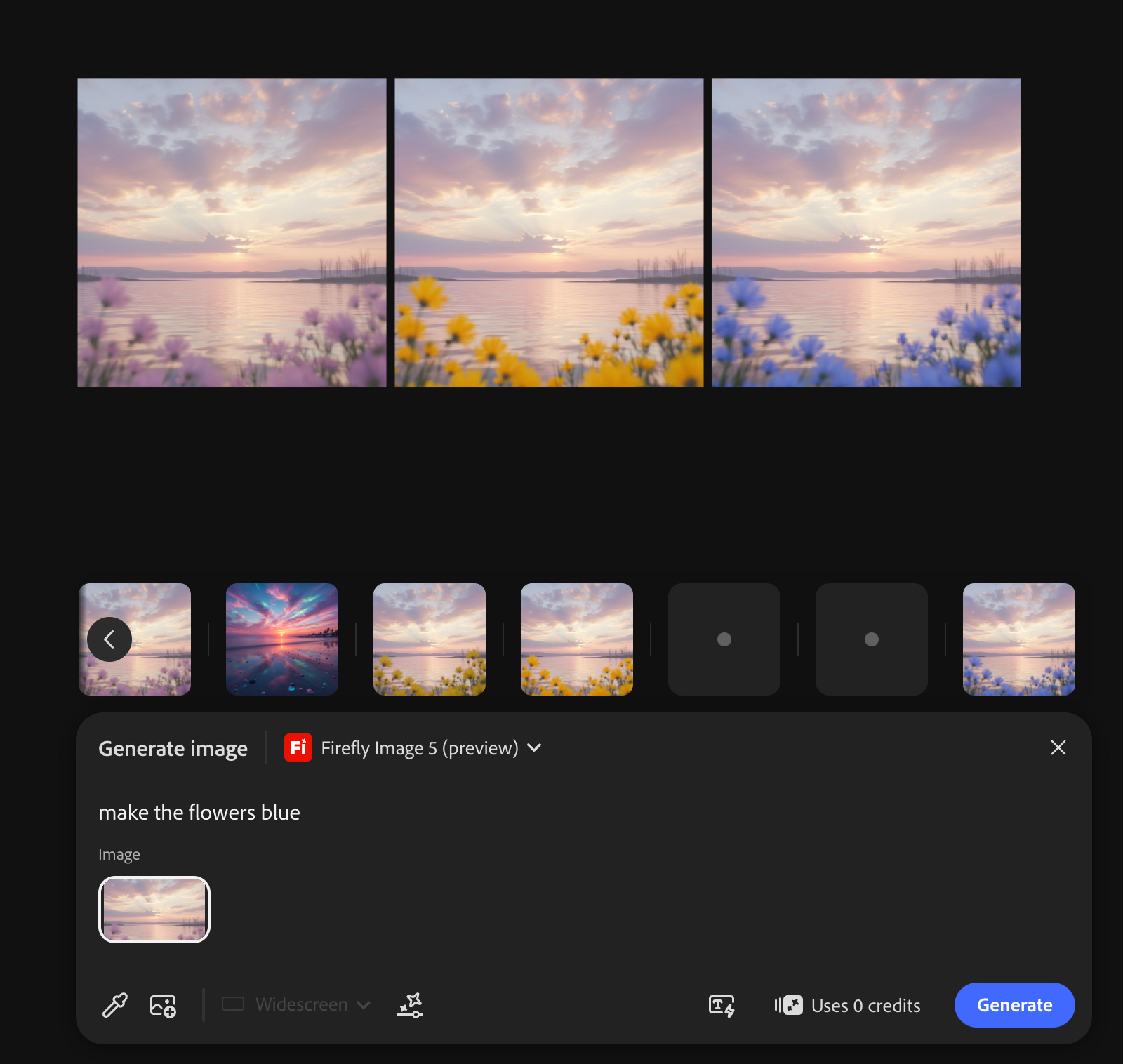
Here’s a dreamy sunset I generated with Nano Banana, but I wanted the flowers to pop… so Adobe Firefly Image 5 entered the chat. Its pixel-preserving edits let me flip the flower colors without changing the image itself at all. Same scene, same lighting, just a nice touch of personality.
That’s the real benefit of multi-model workflows. You’re not struggling to get one tool to do everything. You’re leveraging each model’s actual strengths.
When should you actually use multiple models?
Use a multi-model workflow when:
You need consistency + a different style
You need realism + storytelling
You need speed + refinement
Try this to test a multi-model workflow in under a minute:
Generate a base image in Model A and refine it in Model B.
Here’s the prompt:
‘Create a base image with [style, subject, constraints]. Then pass it to [second model] and apply [refinement detail] while preserving [specific elements].’
Tell me why each model’s traits matter here.
You Don’t Need Expertise, You Just Need a Vision
You don’t need to “learn AI” to start using these tools. There’s this idea that there’s some big learning curve, but really it’s just a conversation. The tools are getting better at adapting to what you’re asking for. You describe what you want, you refine it, and you iterate.
One thing that matters more and more: licensing transparency. Tools like Adobe Firefly that are upfront about being trained on licensed content give creators peace of mind when they’re doing client work or monetized projects. That ethical clarity matters.
When you stop worrying about which tool is “best” and start focusing on what you’re actually trying to create, everything gets easier. The model matters less than your vision and your ability to communicate that vision clearly.
Model selection isn’t about finding the “best” AI. It’s about building a system where you know exactly which tool to use for every situation.
That’s what turns AI from overwhelming to operational.
Now the skill is systems thinking.
It’s knowing your tools well enough to cast the right model for the right job and integrating AI into your workflow so seamlessly that it feels like an extension of your own capabilities, not a separate thing you have to “use.”
If you walk away with one idea, let it be this: great creators don’t pick a favorite AI model. They build a system.
This is exactly what I teach inside AI Flow Club: how to design your own AI systems for your specific workflows. 1,100 creators are already building their AI systems inside.
