

The 2026 AI Operating System
Context, structure, and prompts that turn AI into leverage

Most people overcomplicate AI workflows because they treat the tools like software instead of collaborators.
Software waits for instructions. Collaborators know the plan.
Think about what happens when you bring on a new team member. You don’t just hand them a laptop and hope for the best. You onboard them and share context like what you’re working on, the status of ongoing projects, and goals/targets you’re trying to accomplish.
That’s the difference between a new hire who’s guessing and a team member who knows just what to do.
AI works the same way.
And when you give your AI real context like your goals, your situation, how you want to work together, you’re building something different. You’re building a system.
Your AI remembers what you’re working toward. It gives advice based on your actual situation, not generic tips. It pushes back when you’re being unrealistic. It’s there when you need to think something through.
That's what an AI operating system looks like. Not a chatbot you visit occasionally, a collaborator who knows the plan and helps you execute it all year.
The Drop
AI works best as a collaborator, not a tool. If you don’t onboard it with context, goals, and constraints, you’ll get generic advice and busywork instead of real progress.
Structure beats motivation. Year → month → week → stuck moments. A small set of repeatable prompts turns vague goals into decisions you can act on right now.
Context is the real upgrade. Structured data about your goals, limits, patterns, and preferences is what lets AI push back, prioritize, and give advice that fits your life.
An AI operating system isn’t a chatbot. It’s a connected system where your AI knows what you’re building, why it matters, and how you work. So you stop explaining yourself and start executing.
The AI System That Moves Goals Forward
These four prompts turn your goals into a system you can follow all year. One maps your year, one focuses each month, one plans your week, and one gets you unstuck when you need it.
Monthly Milestone Tracker
Run once. Like, right now
This maps your entire year. The point is having a plan you can look at to figure out what actually matters.
Based on my goals, create a 12-month milestone tracker for 2026.

For each month, include:
- Primary milestone (the one thing that defines success this month)
- 2–3 specific tasks that move this milestone forward
- "What happened" column (leave blank, I'll fill this in during monthly retros)

Format as a table. Be realistic about pacing. Don't front-load everything into Q1.
The magic is in that “What Happened” column that you fill in each month.
This is where you stop lying to yourself about what’s realistic.
Monthly Focus
Run at the start of each month
This sets your monthly target, based on what you’ve done so far.
It's [MONTH]. Based on my milestone tracker and what happened last month:
- What's my primary focus this month?
- What should I NOT do this month?
- Write one sentence that defines "winning the month."
The “what should I NOT do” question is pulling more weight than your entire New Year’s resolution list. Your AI will call out the shiny objects you’re about to chase that have absolutely nothing to do with your actual goals.
And that one-sentence definition of winning? That’s your filter for every decision this month. Someone wants to collaborate? Does this help me win the month? No? Then it’s a “not right now.”
Weekly Actions
Schedule once a week
You know what you’re focused on this month. Cool. Now what does that look like this week?
Based on my monthly focus, what are the 3 most important things I should do this week?

For each:
- Clear definition of done
- Time estimate
- Which one wins if I only finish one thing?
Three things ranked by importance. Because you need to know which tasks actually matter most right now.
The “Clear definition of done” is your escape hatch from spending all week on something that’s never fully finished. Your AI tells you exactly what done looks like so you can close the laptop and move on.
The Unstuck Protocol
Run whenever you’re stuck
Some weeks you’re moving. Some weeks you’re refreshing Instagram for the fourth time instead of doing the thing you said you’d do.
I'm stuck on [task/goal].

Help me figure out:
- Is this important, or am I procrastinating on something else?
- What's the smallest possible next step?
- Is there an alternate approach I'm not seeing?
- Should I adjust the goal or push through?
Half the time when you’re stuck, it’s because you’re avoiding the thing you actually need to do. Your AI will call you out.
The other half, you’re stuck because the next step feels like climbing Everest and you need it broken down into “send one email.”
This prompt gives you both. Plus permission to pivot if the goal itself is the problem. Sometimes the goal is wrong. That’s fine. This is where we fix it and move on.
BONUS: Goal to Tasks Shortcut
This iPhone shortcut takes one goal and breaks it into 10 actionable tasks, then drops them straight into your Reminders app. Like magic.
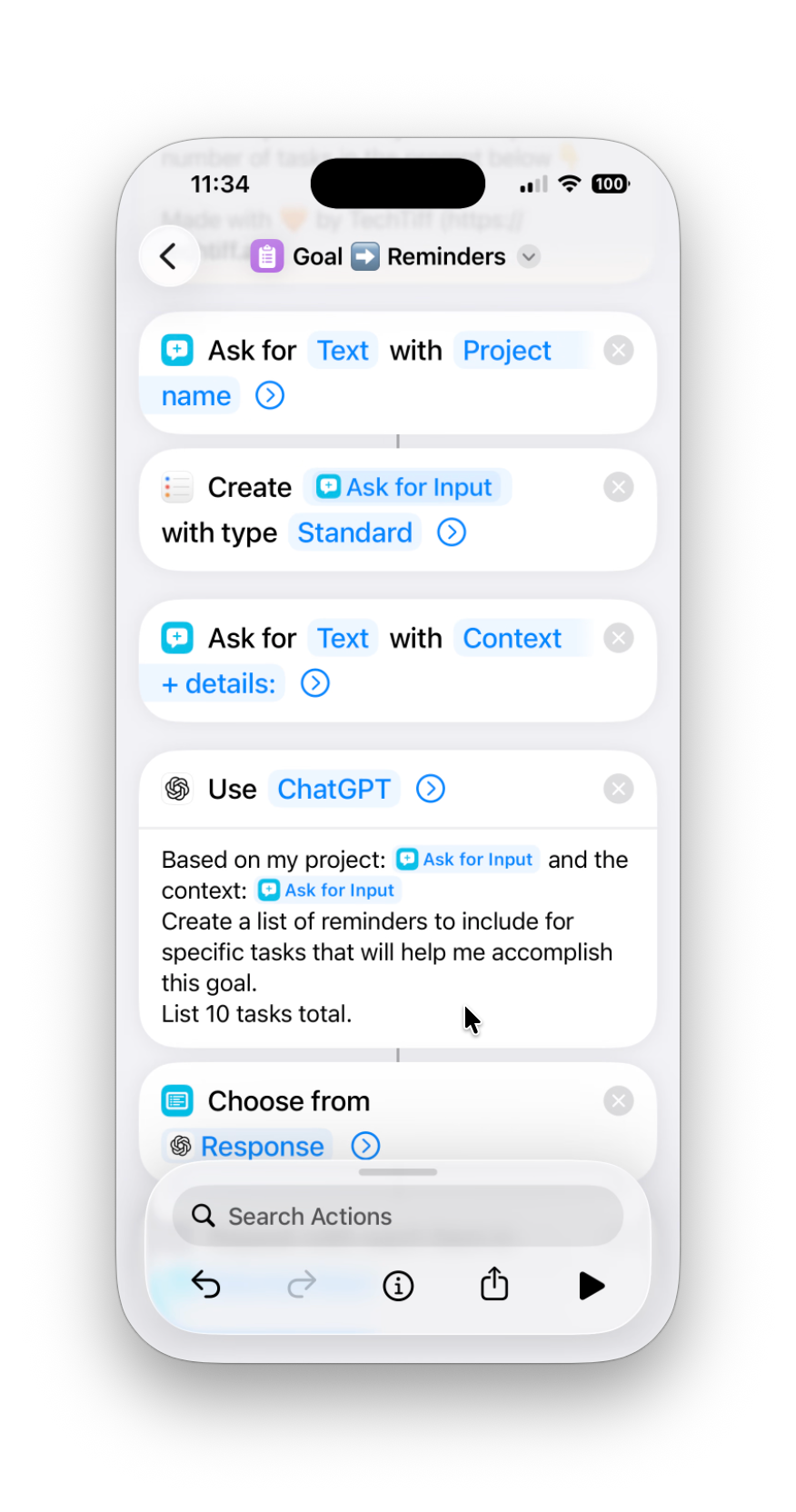
Here’s what happens:
You speak or type a goal (”Launch my course in 60 days”)
The goal added becomes the name of a list in Reminders
You speak or type context + details (”I need to prepare the marketing plan and social assets”)
The shortcut sends it to ChatGPT with a prompt that breaks it into 10 specific tasks
ChatGPT lists the tasks for you to select
Each selected task shows up in your new list in Reminders automatically
You now know what to do today instead of adding “launch course” to your to-do list for three weeks
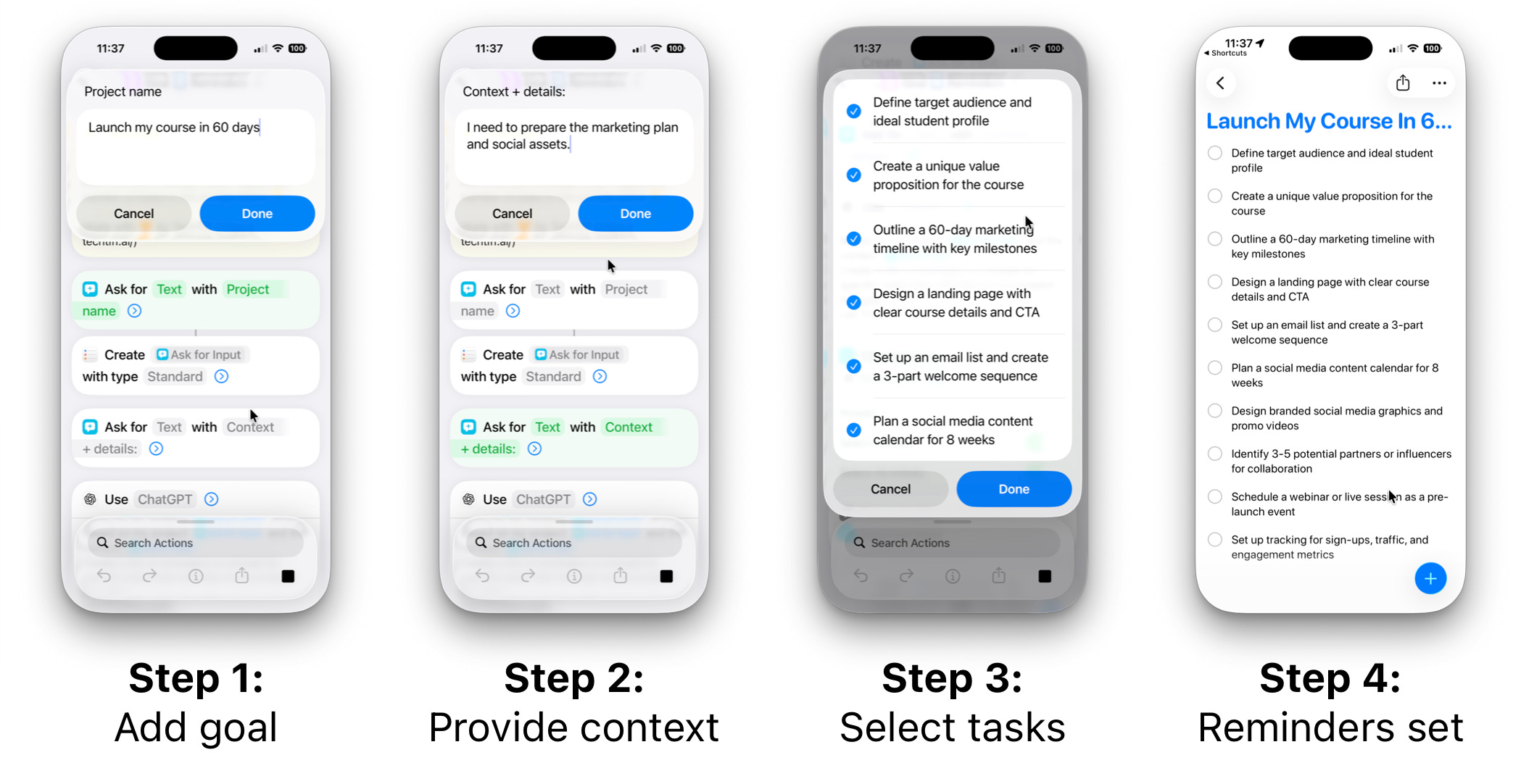
The gap between “I have a goal” and “I know what to do right now” is where most plans go to die. This closes that gap in about 15 seconds.
The Briefing Your AI Needs to Do Real Work
AI can’t do anything useful with a wall of text about your goals. It needs structured data: tables, clear categories, specific details. Not your journal entry from 2am when you were having feelings about your business.
Context includes:
Goals: Specific outcomes, not vague wishes. “Launch a cohort by Q2” not “grow my business” (what does that even mean).
Situation: Constraints and resources. Time, money, energy, whether you have a team or you’re solo and losing it.
Patterns: What derails you. Perfectionism. Shiny object syndrome. Saying yes to everything and then burning out.
Preferences: How you like feedback. Direct? Encouraging? Data-driven? Do you want your AI to be your therapist or your drill sergeant?
Building structured context with NotebookLM
If you’ve got scattered docs, journal entries, half-finished plans, upload them to NotebookLM and use the Data Table feature.
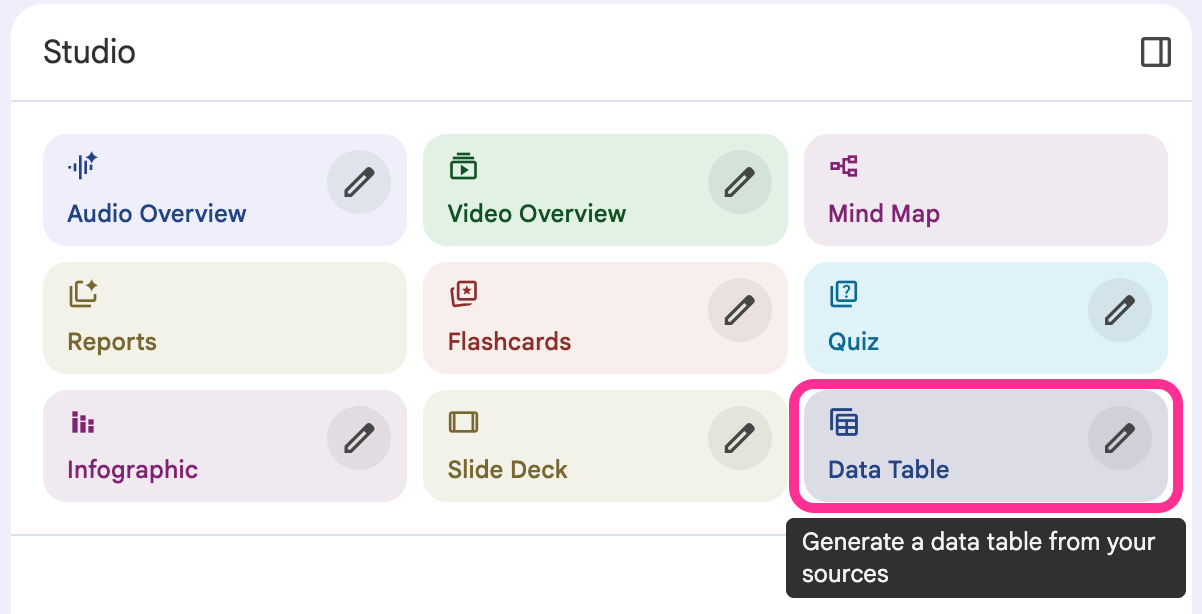
Use a prompt like this:
Create a table with these columns:
- Area (Goals, Constraints, Patterns, Preferences)
- Details (specific information from my documents)
- For 2026 (what this means for planning)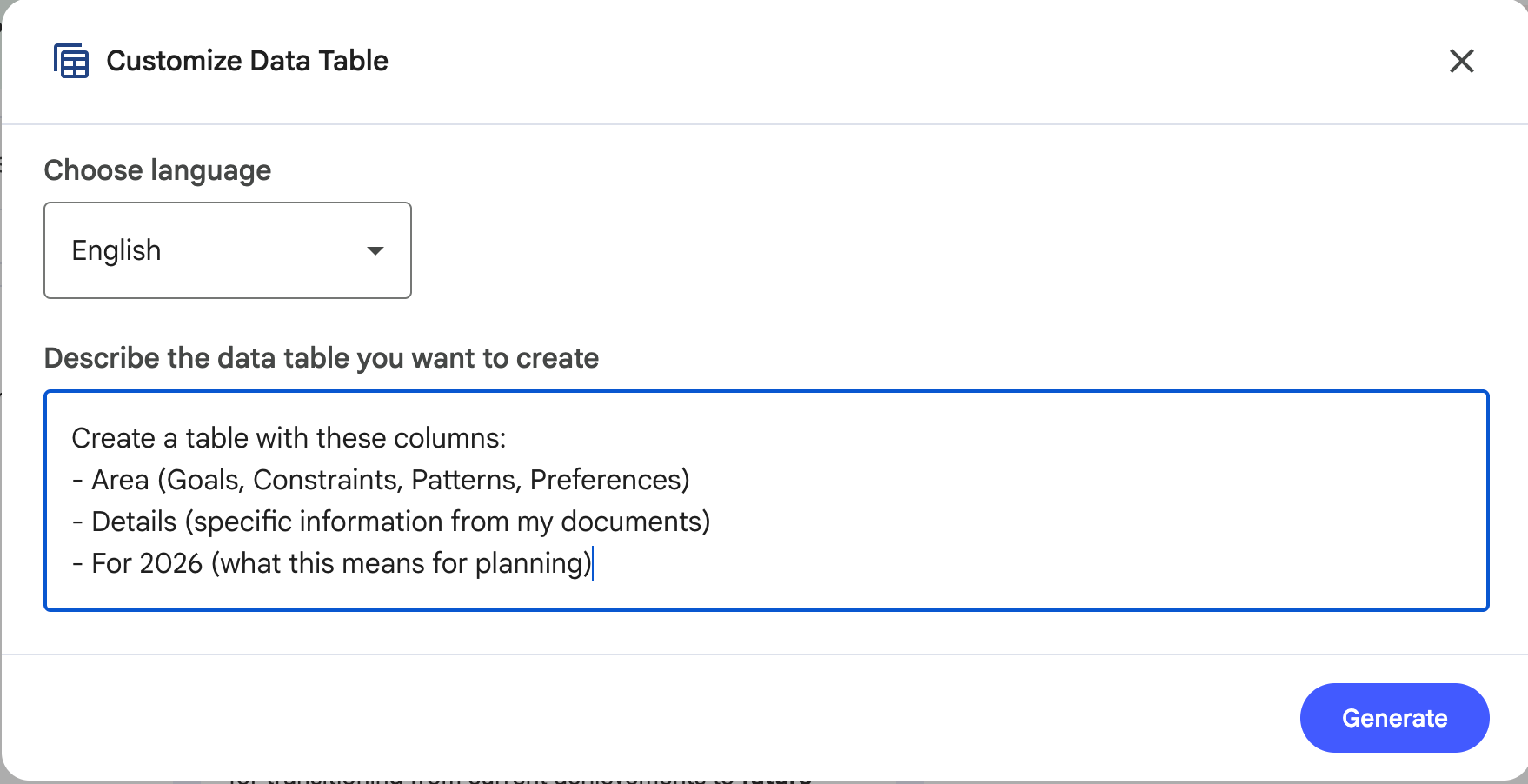
One prompt. Structured context in seconds. Ready to give your AI tools.
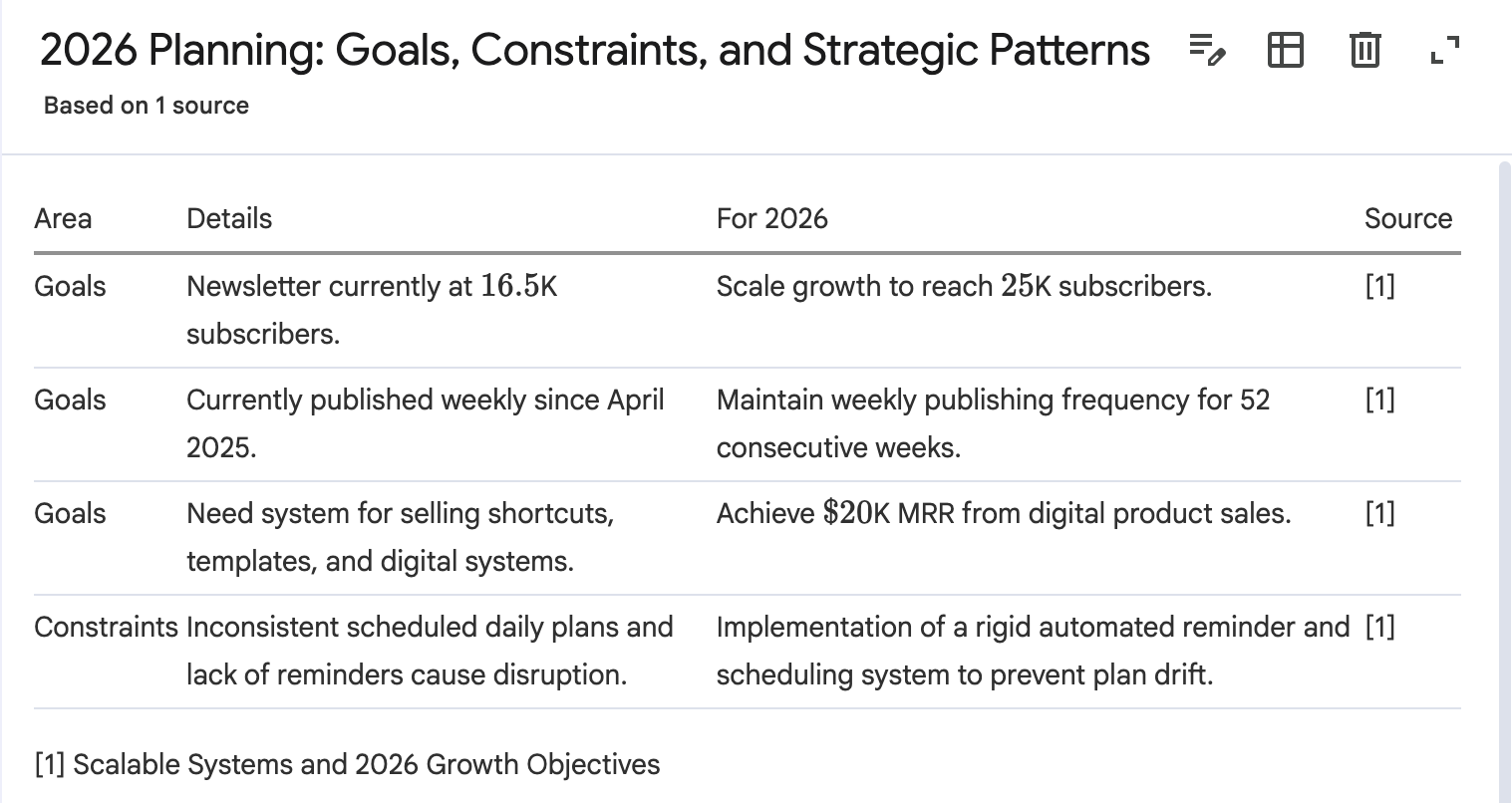
The key: Structure without usage instructions is just organized information. Your AI needs both: the data AND how to use it.
Here’s what I mean:
I want to grow my business and make more money. I struggle with consistency because I get distracted by new ideas. I work best in the morning but I’m always behind on content.
Cool story. Your AI has no idea what to do with that.
Why this matters
Structure alone doesn’t cut it. Structure + usage instructions = AI that actually gets you.
Your AI needs the data AND how to use it. When it has both, it stops giving you advice that sounds like it came from a LinkedIn influencer and starts giving you advice that fits your actual life.
It knows you can’t work nights. It knows you’re solo. It knows not to suggest building a massive funnel when you’ve got $2K and 20 hours a week.
It works with what you have.
Your AI Needs a Brain
The prompts work. They work significantly better when your AI actually knows you.
Think about what a real collaborator knows after working with you for a year. They know your voice. They know what you’re building beyond this quarter. They know your audience, your offers, what you stand for, what you absolutely will not do even if everyone’s doing it.
They don’t just execute tasks, they think with you.
That’s what an AI brain gives you.
An AI brain is structured context that captures who you are, what you’re building, and how you operate. Not just goals, but everything your AI needs to be useful across any conversation, any tool, any “help me figure this out” moment at 10pm.
What’s Inside of Your AI Brain
Eight categories. Fill them in once. Update the parts that change. Connect them to your AI tools so you stop copy-pasting the same context into every conversation like some kind of medieval scribe.
Keep reading with a 7-day free trial
Subscribe to The AI Creator Drop to keep reading this post and get 7 days of free access to the full post archives.