

Claude’s Done Chatting. He's Ready to Work.
Context, execution, and how Sonnet 4.6 finally handles real projects

Claude strolled in this week acting like he finally read the employee handbook. Sonnet 4.6 gave Claude sharper reasoning, cleaner multi-step moves, and output that doesn’t make you want to redo it all yourself.
And, Claude’s got a new hobby: making you look genius. Now he formats docs that won’t ruin your reputation, fills out web forms for you, and acts like a spreadsheet boss.
While most AI loses the plot five minutes into a conversation, Claude’s 1M token context window means you can drop in a 200-page report, months of emails, folders of files, even entire books, and he keeps it all straight. No ‘Wait, what was that?’ Like he’s turned into the coworker who actually read the full email thread.
Claude feels different because now he’s keeping context across massive documents and handling multi-step instructions cleanly to deliver work that’s actually usable. So you’re not just getting better responses, you’re getting full execution.
Here's What Changed
Sonnet 4.6 just leveled up its memory and computer skills, which means you can finally ask him for the messy, real-life stuff. The kind where the info is scattered across five apps, buried in old emails, and needs to come out the other side as something you can actually hit ‘send’ on.
And we are way past the “summarize this” phase. Drop in a contract and its entire email saga, and Claude will tell you every commitment you accidentally ghosted. Pass him your analytics and your last three months of content, and he’ll highlight the topics that actually pay rent. Claude can now run projects start to finish without losing the thread.
Sonnet 4.6 remembers more, follows complex instructions cleanly, and delivers work that’s ready to use. Claude’s done chatting, he’s ready for a real project.
Put Sonnet 4.6 to Work
Claude got a serious upgrade. Now it’s your turn. Here are 7 ways to actually put Sonnet 4.6 to work today.
Build a Project with a Brain
The single highest-leverage thing you can do with Claude right now costs you about ten minutes to set up and pays you back every single session after that: build an AI brain.
Create one document that contains everything Claude needs to work with you:
Your role
Who you serve and what they struggle with
What you sell
How you communicate
What you’re focused on right now
And add anything Claude tends to get wrong.
Claude Projects are how you end the cycle of starting every session from scratch.
If you’re not using projects yet, they are persistent workspaces inside Claude where you upload your context once (your role, your audience, your offers, your voice, your current focus) and every conversation inside that project opens with Claude already oriented. No pasting, no re-explaining, no setup tax. You do it once and it holds.
Create a Project, drop your key documents into it, and write a short instruction set telling Claude how to work with you. Every chat you open inside that project inherits all of it automatically.
Project instructions to steal:
You are my AI business partner. Here is what you need to know to work with me effectively:

NAME/ROLE: [your name and what you do]
MY AUDIENCE: [who they are, what they struggle with]
MY OFFERS: [products or services with prices]
MY VOICE: [3-5 descriptors]
CURRENT FOCUS: [what you're actively building or promoting]
AVOID: [anything Claude keeps getting wrong]
The version you build today doesn’t need to be perfect. Update it when something changes. I revisit mine monthly.
A rough Project Brain running on day one is worth more than a polished one you build next month.
Handle Long Email Threads
Long threads are where action items go to die. Someone mentions a deadline in reply number four, three people weigh in on something unrelated, and by the time you get to the bottom you’ve lost the original ask entirely.
Paste the whole thread into Claude and ask for a clean summary with:
a list of every action item with the person responsible
every date or deadline mentioned
a draft reply that addresses what’s still open.
What comes back is the thread, processed. You’re not re-reading the same chain twice trying to find what you missed.
Deadlines are the one thing I always double-check. Claude pulls them accurately most of the time, and most of the time isn’t good enough when something is actually due.
Prompt:
Here is an email thread: [paste thread]

1. Summarize what this thread is about in 2 sentences
2. List every action item with the person responsible
3. Pull any deadlines or dates mentioned
4. Draft a reply that addresses any open questions,
   direct and without filler
Work with Long Documents
The instinct when a 40-page document lands in your inbox is to skim it, flag it for later, and quietly dread it until later becomes now.
Upload it to Claude instead. Ask him:
what the document is actually asking you to do
what terms or clauses are worth a closer look
what deadlines or deliverables are buried inside
what questions you should be asking before you respond or sign.
Claude reads the whole thing and hands you the specific information you actually needed. The document doesn’t get shorter, but the time you spend on it does.
Prompt:
Here is a document I need to understand: [upload file]

1. What is this document asking me to agree to or do?
2. Are there any clauses or terms worth flagging?
3. What are the key dates, deadlines, or deliverables?
4. What questions should I be asking before I respond?
Turn Data Into a Presentation
A finished presentation used to require hours of manual work pulling numbers from multiple places and building slides from scratch. Claude closed the gap between having data and presenting it.
I had a YouTube analytics tab open and decided to see how Claude’s new presentation skills were, so I asked him to generate a slide deck to present my video performance.
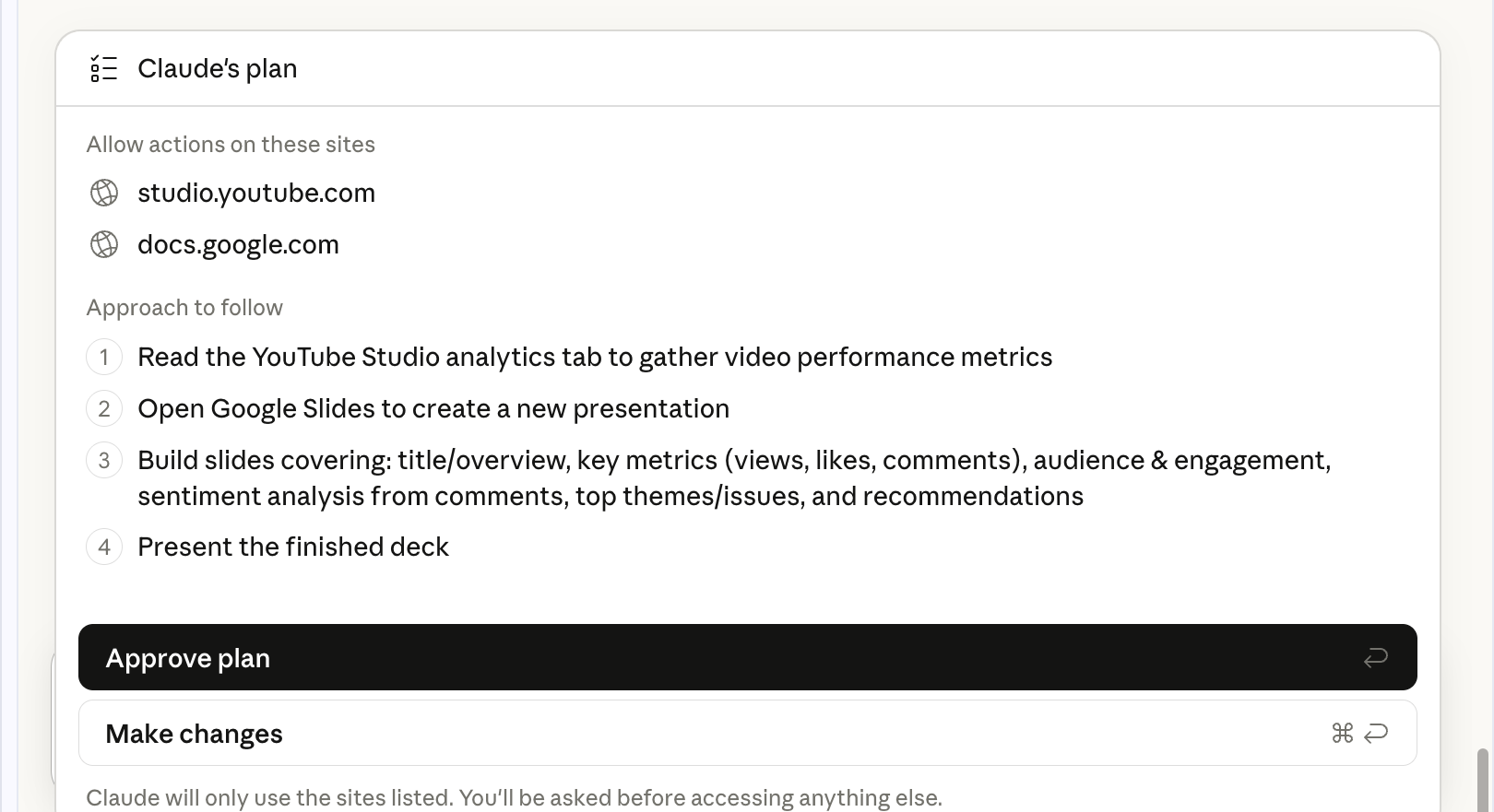
Before touching anything, Claude laid out a plan:
Read the analytics tab
Open Google Slides
Build slides
Then he asked me to approve the plan before starting.
Claude read the live numbers directly from the open tab, clicked and scrolled for deeper insights, and built the deck.
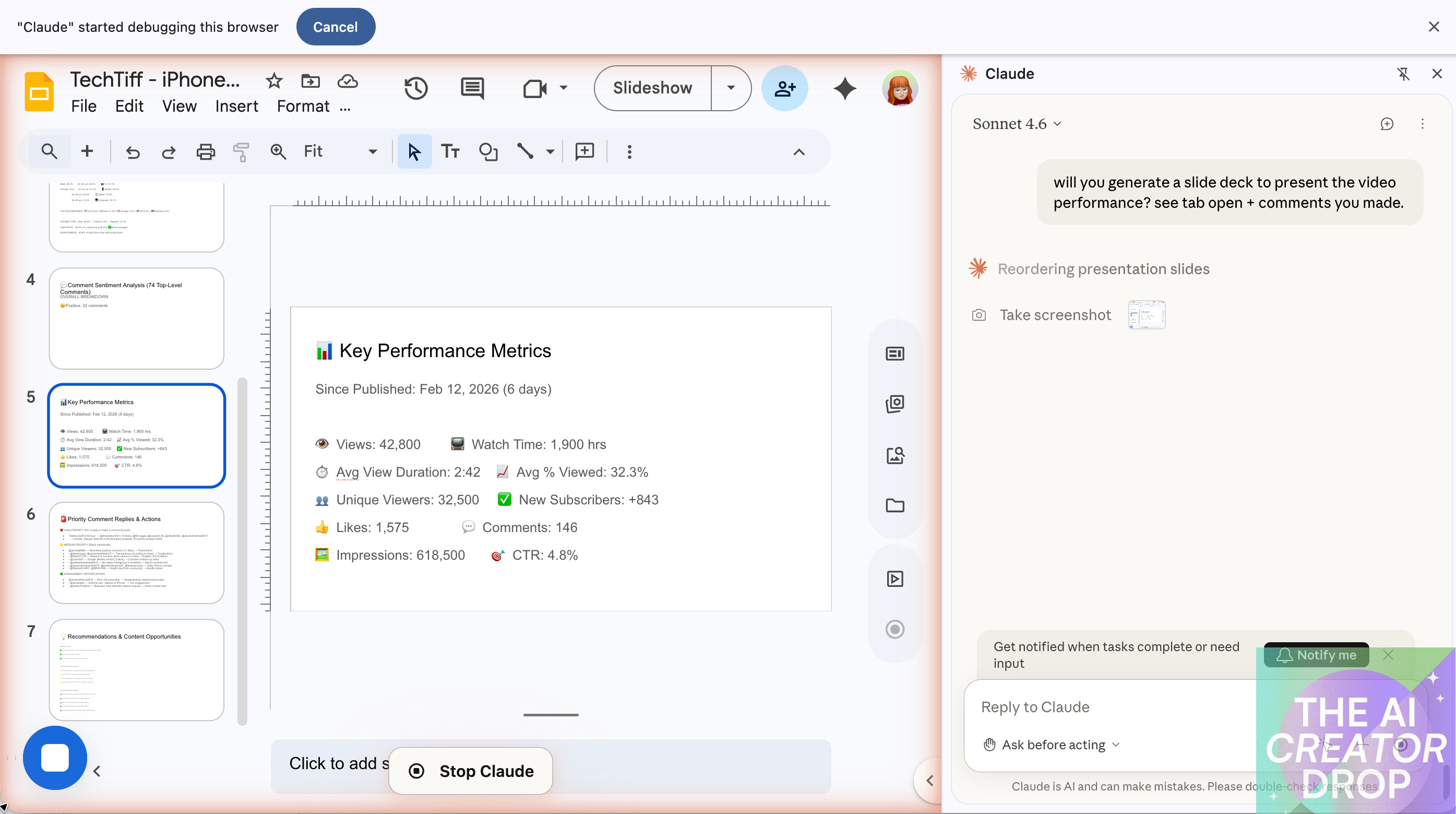
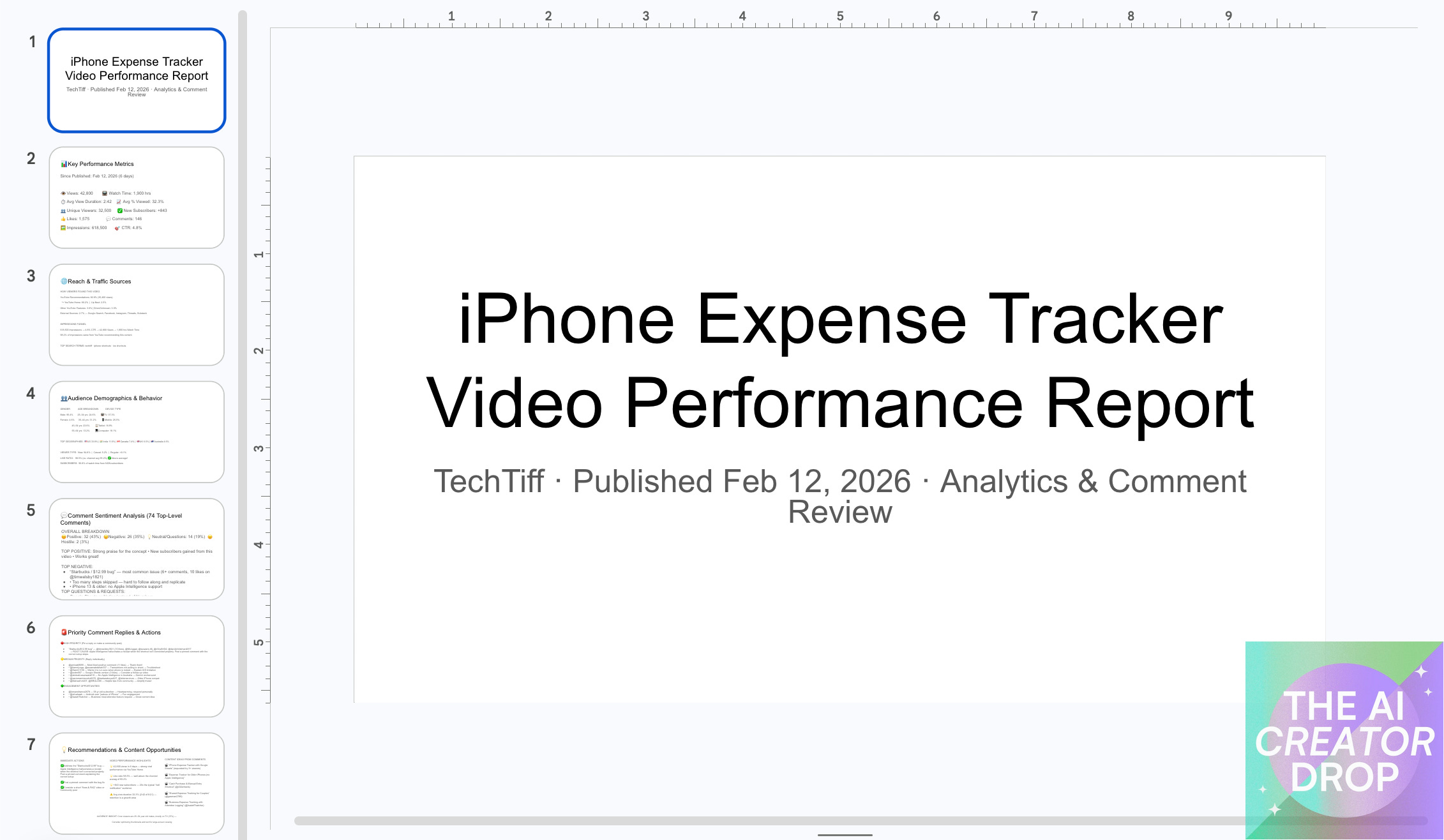
Normally that’s where the real work starts: adjusting, reformatting, fixing what the AI handed back. But this time I watched Claude reorder the slides on his own.
He moved the recommendations slide to the front because that’s what the person reading it actually needs to see first.
The result was a clean, finished deck directly in Google Slides.
This works for any data you have open or uploaded: sales reports, survey results, project dashboards, campaign performance. Point Claude at what you have and tell him what the finished deck should contain.
Prompt:
I have [describe what's open/uploaded or drop in a URL: spreadsheet, report, browser tabs].

Build a presentation with the following slides:
- Slide 1: Top 3 highlights (with numbers)
- Slide 2: What's working and why
- Slide 3: What needs attention
- Slide 4: Key insights about the people or data involved
- Slide 5: One priority action for the next 30 days

Flag anything you're uncertain about rather than assuming.
Get More From Your Spreadsheets
Your spreadsheet becomes a working tool the moment Claude can read it.
Hand him a sales file and ask for a breakdown by region, a tracker built from the existing data, or a report cross-referencing it against another source you have open and he reads across all of it and hands back something you can actually use.
Analyze spreadsheets:
Here is my spreadsheet: [upload file]

I need you to:
- Analyze the data and tell me what it shows
- Cross-reference it with [describe second source if applicable]
- Build a [tracker / report / summary] from what you find
- Flag anything that looks like an error before touching it
- Return your output with a summary of what you did and why
And if you need clean data to work from? upload your file and tell Claude: what’s wrong with it, and what clean looks like.
Claude standardizes formats, removes duplicates, fixes inconsistent capitalization, flags anything that looks like an error or an outlier, and returns the cleaned version with a summary of every change it made and why. Nothing gets deleted without being flagged first.
Cleanup spreadsheets:
Here is a spreadsheet that needs cleanup: [upload file]

- Standardize all date formats to MM/DD/YYYY
- Remove duplicate rows
- Fix inconsistent capitalization in [column name]
- Flag any cells that look like errors or outliers
- Return the cleaned version with a summary of
  what you changed and why

Do not delete any data without flagging it first.
Analyze Responses at Scale
When responses come in volume, whether it’s customer reviews, survey results, client feedback, or community replies, the ones that matter most are the hardest to find.
I gave Claude in the Chrome Extension a link to a YouTube video where I had gotten some comments I still needed to respond to and asked him to take a look.
He extracted 74 responses and came back with a full spreadsheet of data.
A comment with 11 likes got flagged as high-engagement worth a public thank you.
A recurring technical issue got flagged as a pinned reply candidate.
A workaround someone shared in the comments got flagged as worth amplifying.
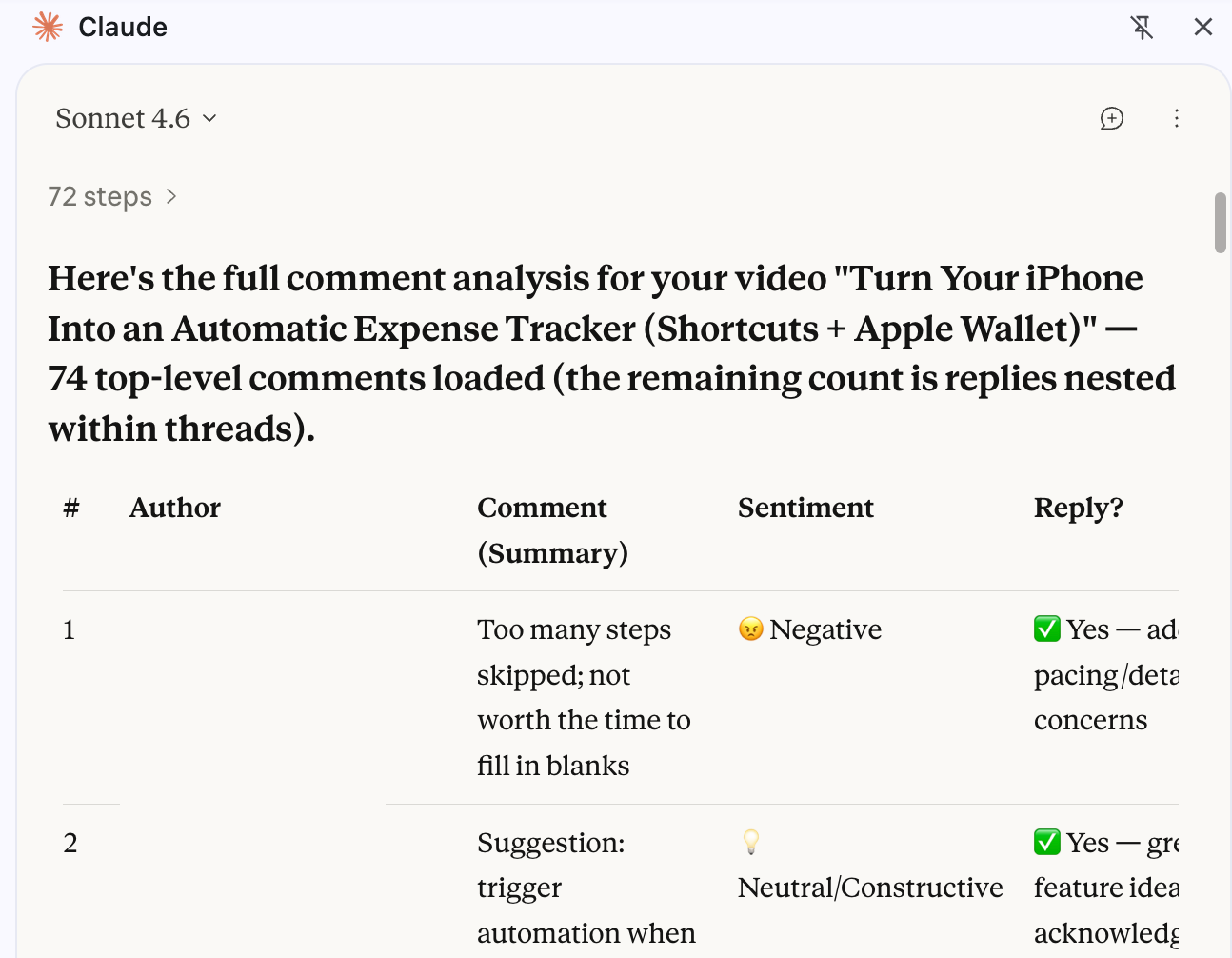
Every entry summarized, tagged by sentiment, and flagged with a specific reply recommendation and the reason behind it.
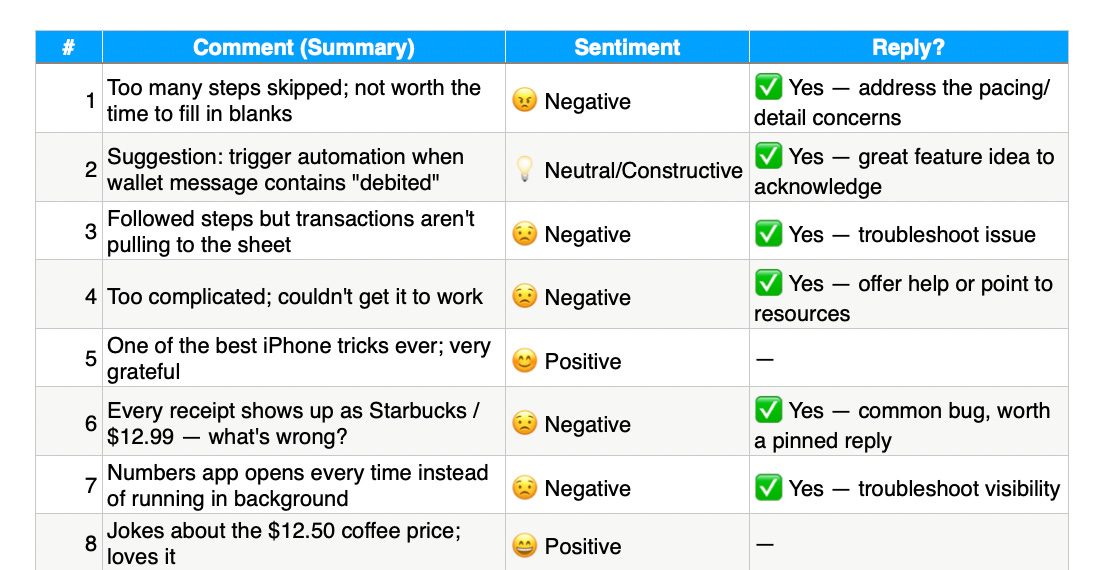
Claude just did the digital dirty work: 74 comments read, ranked, and served with reply recommendations. And the whole job took just two minutes.
Prompt:
Here are responses I need to analyze: [paste text, upload file, or share link]

Return a table with:
- Summary of each response (1 sentence)
- Sentiment: positive / negative / neutral / constructive
- Reply needed: yes or no
- If yes: specific reason and suggested action

After the table:
1. Top 3 themes across all responses
2. Most urgent item to address
3. Any patterns worth noting
Run a Multi-Step Project
Most people use Claude the way they’d use a search bar: one question, one answer, next question. That’s not a workflow, and it’s not using what Claude can actually do.
Give it a complete job instead. Define the goal, lay out the steps in sequence, and ask Claude to show you the output of each step before moving to the next so you can redirect if needed. It plans, executes, checks in, and delivers.
Prompt:
I need you to complete a multi-step project. Here is the full scope:

GOAL: [what done looks like]
STEP 1: [first task]
STEP 2: [second task, builds on step 1]
STEP 3: [final deliverable]

Work through each step in order. Show me the output  of each step before moving to the next so I can  approve or redirect.

When complete, give me a summary of what you built and any recommendations for next steps.Happy Birthday, Claude Code
This week Claude Code celebrates it’s first birthday and Anthropic is throwing a birthday party in San Francisco to celebrate. I’ll be there tonight covering the showcase, and the timing is perfect because Anthropic just dropped Claude Sonnet 4.6 this week.
One year ago Claude Code was a hackathon project. Today it’s how thousands of founders are building. If you want the real-time breakdown, make sure you’re following along on Instagram.
I’ll have a full breakdown in next week’s issue, but if you haven’t looked at what Claude Code can do for your business yet, now’s the time to pay attention.
Execution is the Upgrade
Sonnet 4.6 changes what you assign to AI. Now Claude holds context across real projects, follows multi-step instructions without drifting, and hands back work you can actually use. That moves him from assistant to operator.
And this shifts how you’re working because you can give it the whole job in one prompt. When AI can see the full scope, remember the constraints, and execute in sequence, the bottleneck stops being the tool. It becomes the clarity of your direction.
If you’re still treating it like a chatbot, you’re leaving leverage on the table.

The upgrade isn’t a new model, it’s how you use it. Build a workflow and let Claude execute.
Interesting insights on Claude and project execution. Your exploration of how context shapes communication reminds me of our piece on how language interacts with perception in "Text Has Curvature"—I think it's a compelling read in relation to your post: https://theuncomfortableidea.substack.com/p/words-bend-through-space-and-we-just.