

Claude is Tired of Talking
How Claude’s new interactive visuals are turning complex data into conversational diagrams

Claude used to write answers. Now he draws them. Custom interactive visuals are live in chat, and once you see what he builds mid-conversation, text responses are going to feel like getting directions without a map.
This week I got early access to try out Claude’s new interactive visuals. So, naturally, I handed Claude my expense spreadsheet and asked him to show me where exactly all my money was going.
He came back with a full spending dashboard and called me out for categorizing my tacos as a “health” expense. We had to agree to disagree on that one.
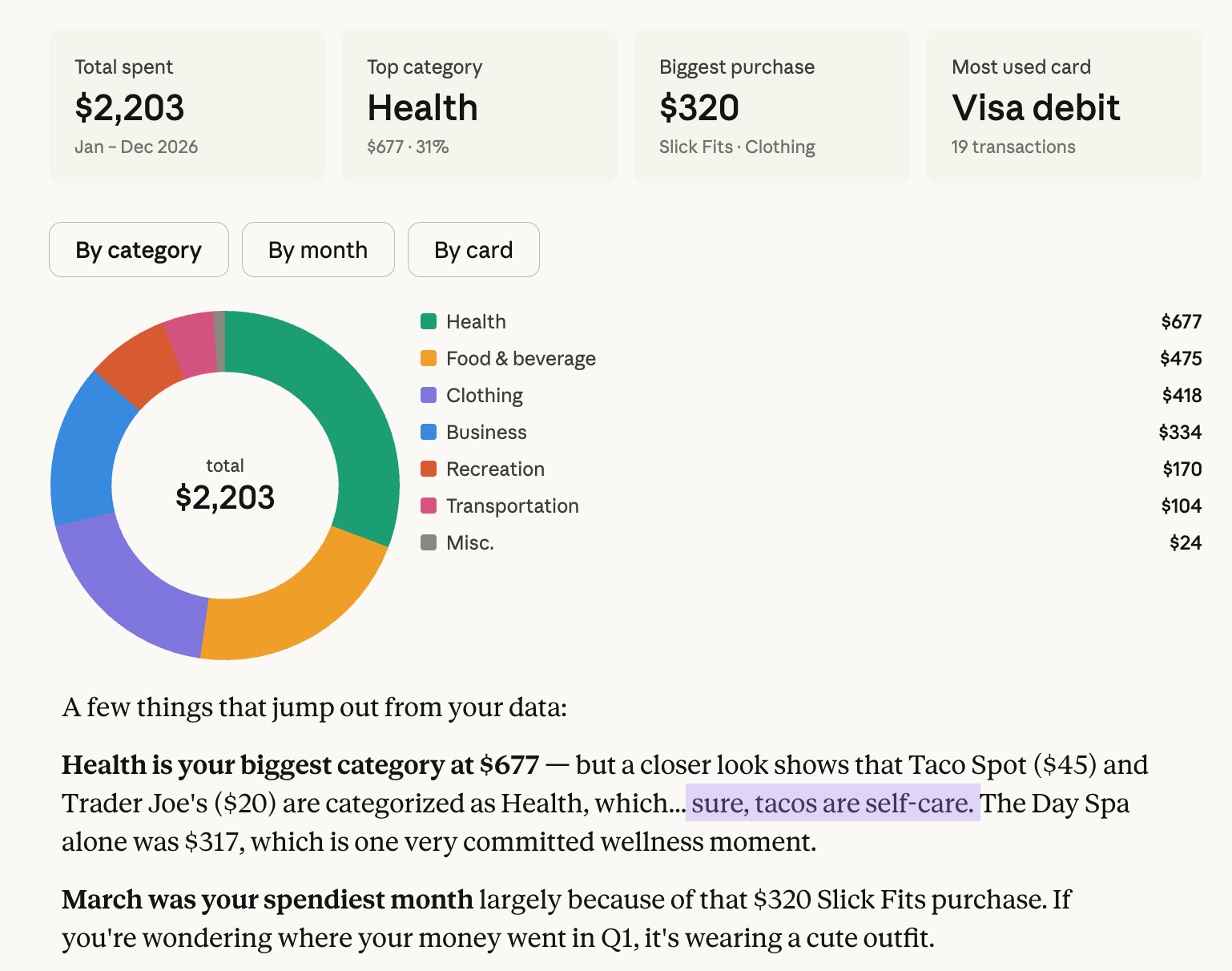
From there he spun up monthly recaps, category breakdowns, and had some notes on how to clean up my spreadsheet while he was at it.
The spending dashboard Claude built from my spreadsheet did not require a tutorial, a separate tool, or a new workflow. All of it, inside one conversation.
Claude Found His Visual Voice
While Claude’s ability to roast my spending habits feels like a new superpower, the seeds for this visual logic were actually planted a few months ago.
Last Fall Anthropic previewed Imagine with Claude, where they basically handed Claude a sketchbook and said, “Go wild.” Now they’re bringing a version of that to Claude’s chat conversations.
Now Claude knows when a visual will explain something better than text. He’s using diagrams and visualizations right inside your conversation. Or you can boss him around with prompts like “make it a diagram” or “visualize the change.”
The visual appears inside the conversation. It’s Claude’s own little whiteboard, pulled out in the moment to help the idea land while you’re still in flow. They are Claude’s in-the-moment explanation tool, built to help the idea land while you are still in the thread.
The Right Layout for the Right Moment
That makes them different from Artifacts, which are built to be extracted and shared. Artifacts are standalone deliverables: a document, a spreadsheet, a piece of code you can open, edit, share, and come back to. They have a life outside the chat.
These visuals are the whiteboard on the wall of the room you are meeting in. Artifacts are what you hand someone on the way out the door.
Artifacts are the finished document, but these visuals are the thinking process.
Moving Beyond Text
Claude learned to present like he means it. Recipes arrive with ingredients first, steps second. Weather checks come with visuals. Claude’s even dropping interactive maps, pins and all, right into the chat.
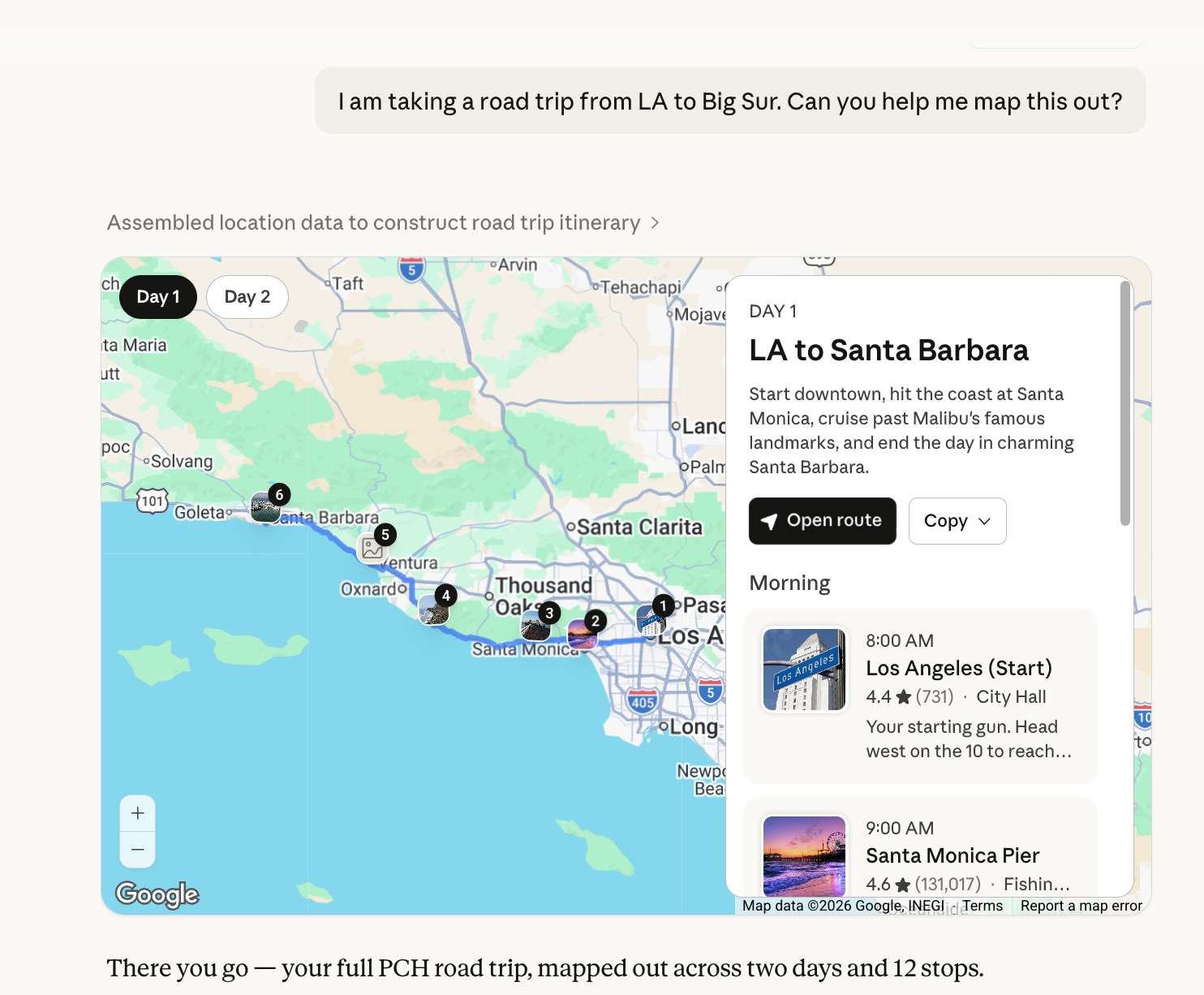
Now Claude is choosing the right medium for whatever idea he’s explaining. Depending on what you ask, the response might become a chart, a diagram, a structural model, or an interactive system you can click through, and Claude is making that format decision based on what will help the idea land.
The pattern was already there. Interactive visuals are the next layer.
The Big Picture (Literally)
Let’s be honest: some ideas just land better when you can see the system instead of reading about it. Text is great for nuance, but for understanding how things actually work, nothing beats a live look. I decided to throw a few 'how-does-this-work' prompts at Claude to see if he’s actually a good teacher, or just playing with his art supplies.
First I asked Claude to show me how caffeine works. He drew the receptors, where adenosine normally binds, and then slides caffeine into the same slot like a decoy.
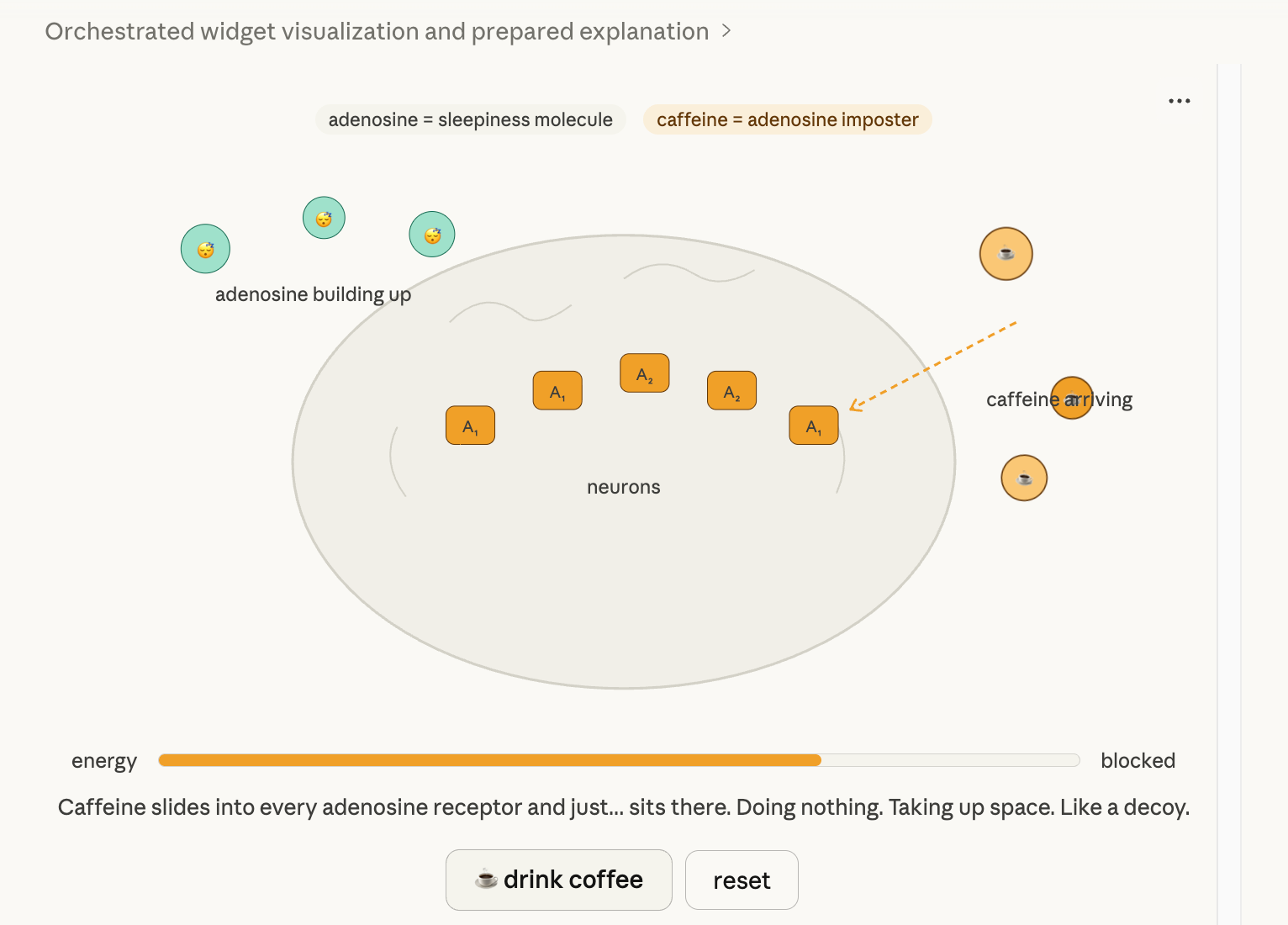
But the interesting part is that it was interactive: Claude included a little “drink coffee” button. Click it, and caffeine floods the receptors, blocking adenosine from doing its job. The energy bar jumps. Hit reset, and the system rewinds so you can watch it happen again.
Claude turned the explanation into a tiny, interactive simulation right inside the thread.
I asked about geodesic domes as home structures.
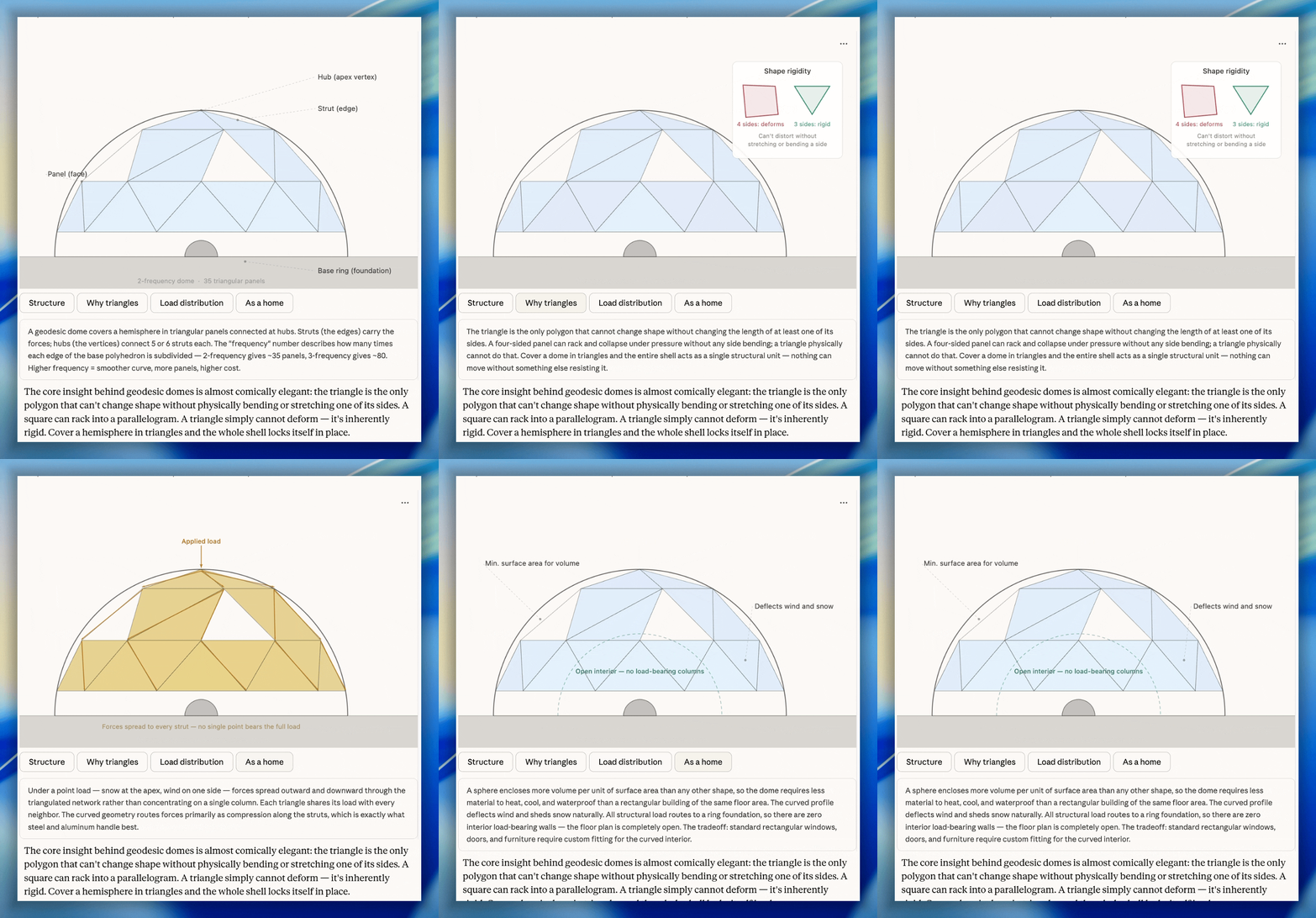
He drew one, fully labeled, with clickable tabs walking through load distribution, why triangles are structurally rigid, and what the space actually looks like to live in.
Then I asked how Bluetooth works.
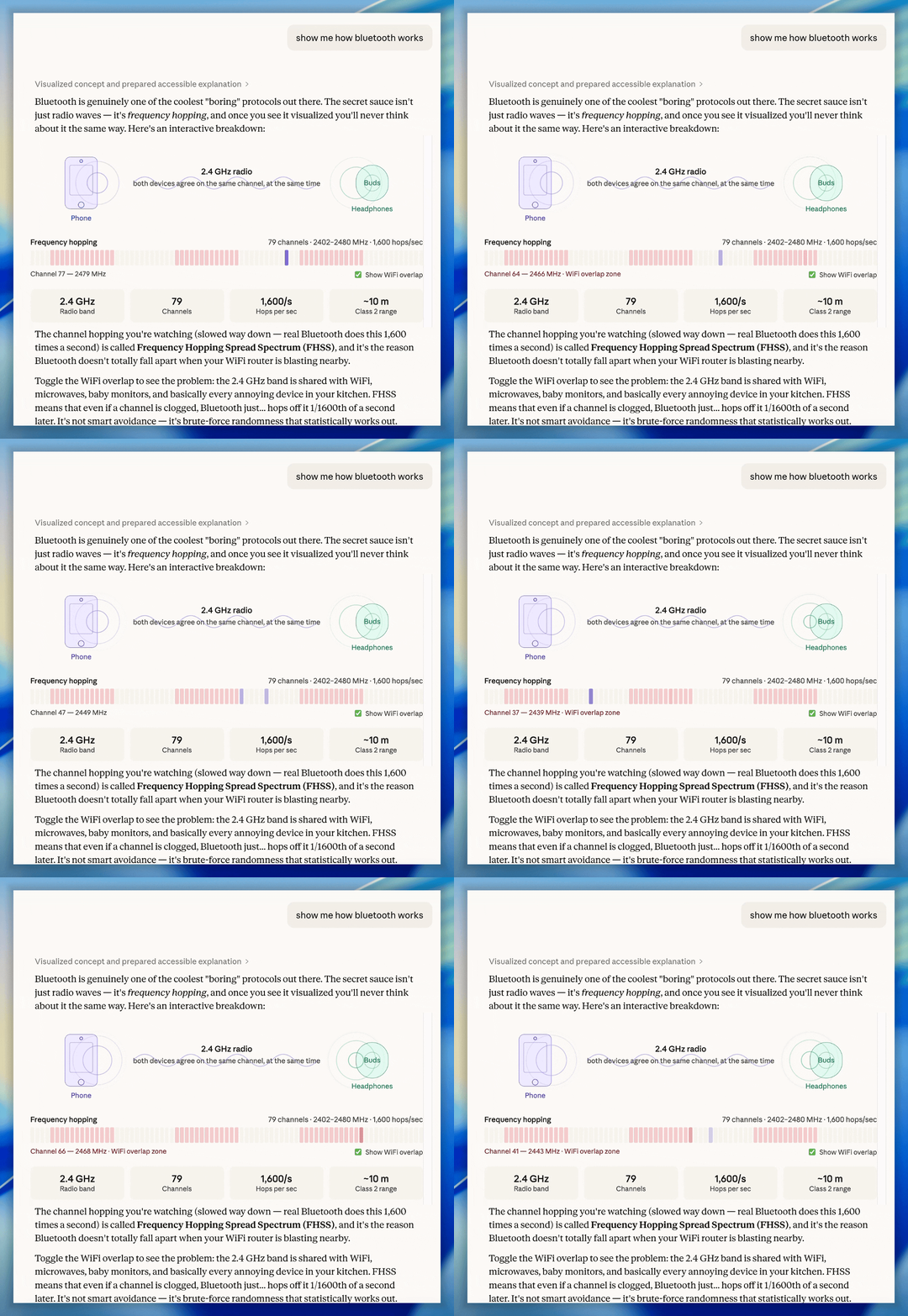
Claude mapped out the frequency hopping pattern across the 2.4 GHz band in a live visualization.
Suddenly, a phrase like ‘1,600 hops per second’ isn’t just an abstract idea. You can literally watch the system pulse as it jumps channels to avoid interference.
Some ideas just need a diagram.
When the Explanation Needs Scale
Beyond mapping systems, Claude uses visuals to provide a much-needed sense of perspective.
Claude compared the height of a mature Coast Redwood to a six-foot Christmas tree and suddenly the numbers stopped being numbers.
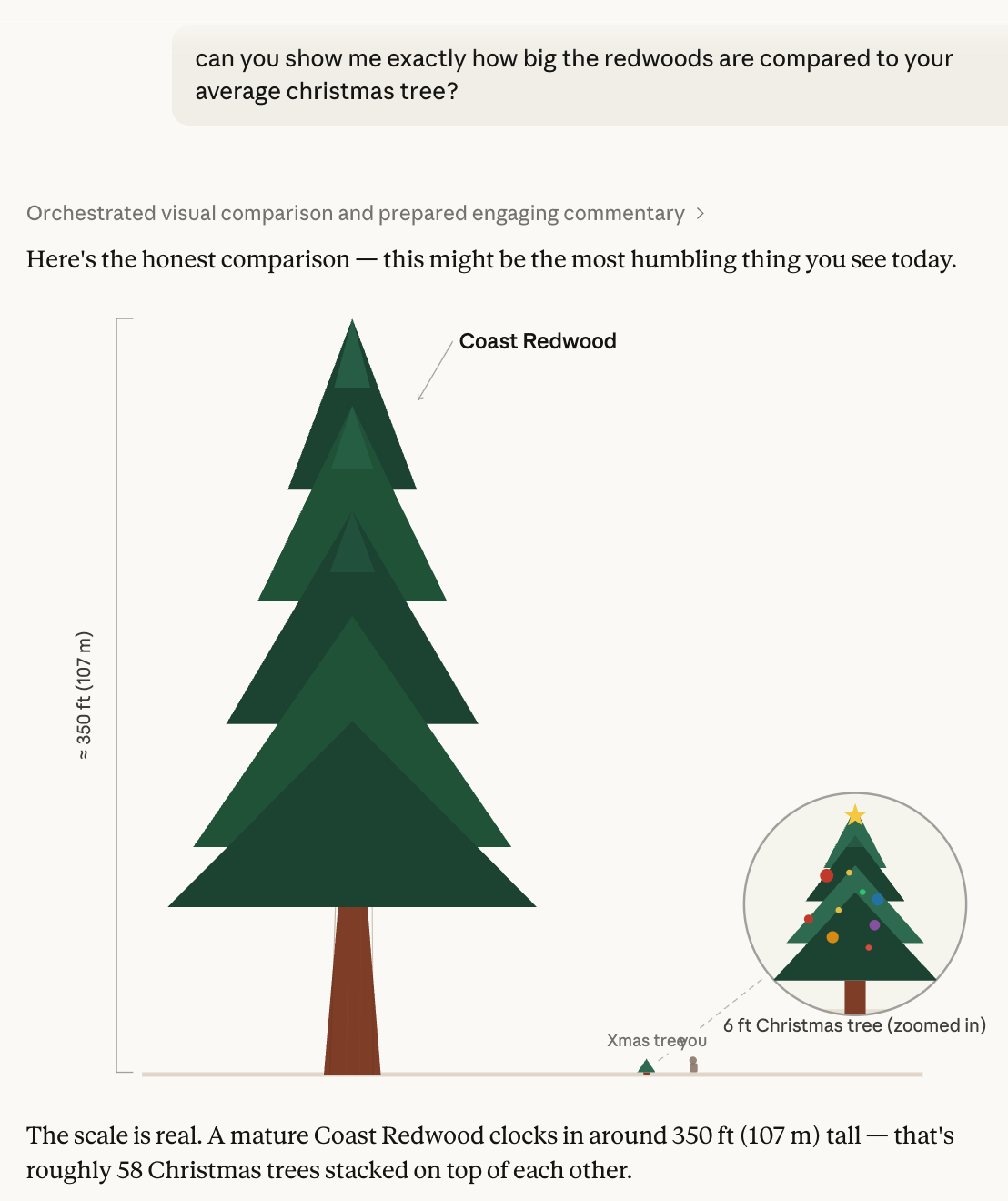
Claude identifies exactly which visual will make an idea stick and generates it in the moment.
Same feature, four completely different formats. Claude reads the question and chooses the medium that would make the answer land. That is the whole point.
Your Information Stopped Requiring a Cover Charge
Once upon a time, asking your data a visual question meant signing up for an unpaid internship in Excel. Analyze the numbers, guess the chart, build the chart, tweak the chart, and pray nothing changed tomorrow.
All those dashboards you pretended to love? They were just a subscription tax for your own information. Claude doesn’t play that game. Drop in the numbers, ask for what you need, and your answer builds itself, visuals and all. Insight without the cover charge.
Claude doesn’t play that game. By turning the “thinking process” into a live visual, the friction between a question and an insight has disappeared. You don’t need to be a data scientist to see a trend, and you don’t need a UI designer to map a system. You just need to ask.
We’ve moved from a world of “requesting a report” to a world of “having a look.” Information is finally speaking our language. And, it turns out, that language is mostly pictures. Insight no longer has a cover charge; the whiteboard is finally open.

This is cool! I’ve been using Claude Code CLI and asking it to make a webpage for anything where visuals are helpful. Even with its design skill enabled, the stuff it makes is functional but not great aesthetically. I’ll have to try some of the same info here and see how it does.
Haha, Tacos is absolutely self care. I should get Claude to analyse my finance spreadsheet. See what similar fun stuff it calls me out as categorising wrong.