

Stop Asking Claude What to Do. Start Assigning Projects.
From AI Advisor to AI Coworker: What Changes When Claude Actually Executes


Claude used to be that coworker who always had great ideas and mysteriously never touched the actual work. Now he shows up with a project plan, a task list, and files already saved.
HR didn’t warn us about this promotion.
For the last few years, working with AI meant staying inside the chat window. You asked a question, got an answer, followed up, corrected course, and repeated the cycle until something usable emerged. The model didn’t move on its own. Every step depended on you being present, steering, and sequencing the work.
Claude Cowork changes the structure of the interaction.
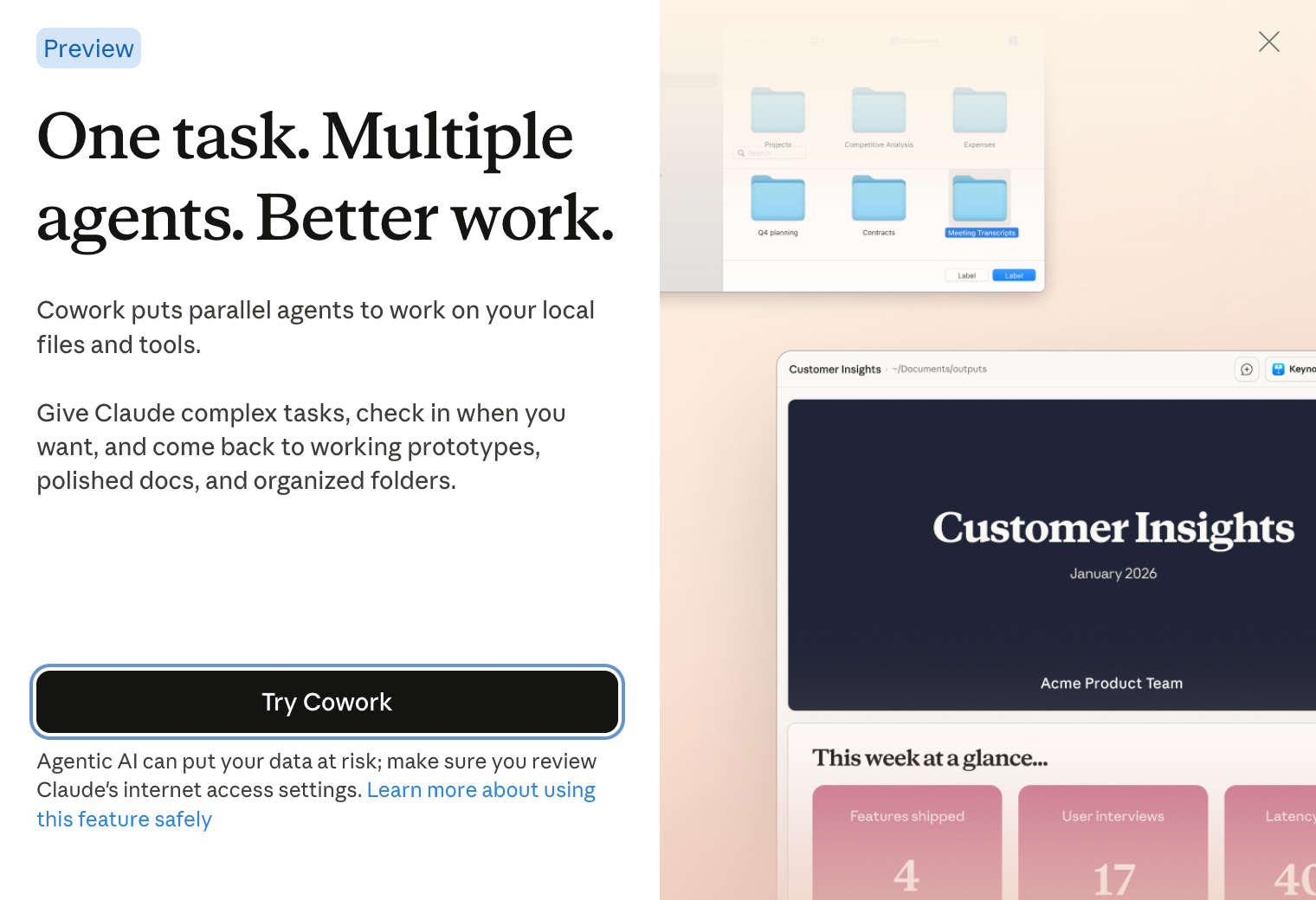
Instead of guiding each step, you define the outcome, scope access, and constraints up front. The work no longer advances because you said the next thing correctly. It advances because the system is designed to plan, execute, and deliver within the boundaries you set.
The Drop
Stop chatting and start delegating. Claude plans the work, executes it, and hands you finished files instead of partial answers.
Project clarity replaces prompt finesse. Clear outcomes, scoped access, constraints, and deliverables matter more than phrasing the “perfect” request.
Work becomes visible and inspectable. You see the plan, progress, artifacts, and tools in use, not just the final output.
Continuity lives in systems, not memory. Reusable results come from saved files, templates, and SOPs, not Claude remembering past chats.
Claude Got the Promotion You Didn’t Know He Applied For
Claude used to be a chatbot. You asked questions, Claude provided answers. You requested suggestions, Claude gave instructions. The output was always advice you had to implement.
Now, Cowork shifts Claude into agentic mode. Translation: Claude makes plans, executes them, checks his own work, and delivers finished files.
What Is Claude Cowork?
Anthropic announced Claude Cowork this week, and it changes what Claude can do on your desktop. If you’ve been working with Claude Code, you know it’s powerful: it’s an agentic system built to handle complex, multi-step work by planning tasks, sequencing them with explicit to-do lists, and executing against real files, instead of just responding in chat.
Cowork brings those capabilities directly into the Claude desktop app. No coding required. No developer environment. Just Claude, now capable of managing projects instead of just chatting about them.
Here’s what you actually get: A visual to-do list that shows Claude’s plan for your project before he starts. Progress tracking so you can see what he’s working on in real time. And real file outputs, documents, spreadsheets, presentations, created and saved to your folders.
The context lives in your folders. Claude works with your actual files, not copies or descriptions. You’re not explaining what’s in your documents anymore. You’re giving Claude access to the source material and letting him work directly with it.
The visibility matters more than you’d think. You’re not wondering what Claude’s doing or whether he understood the assignment. The to-do list updates as he works. You see him move from research to drafting to checking his work. The process isn’t hidden anymore.
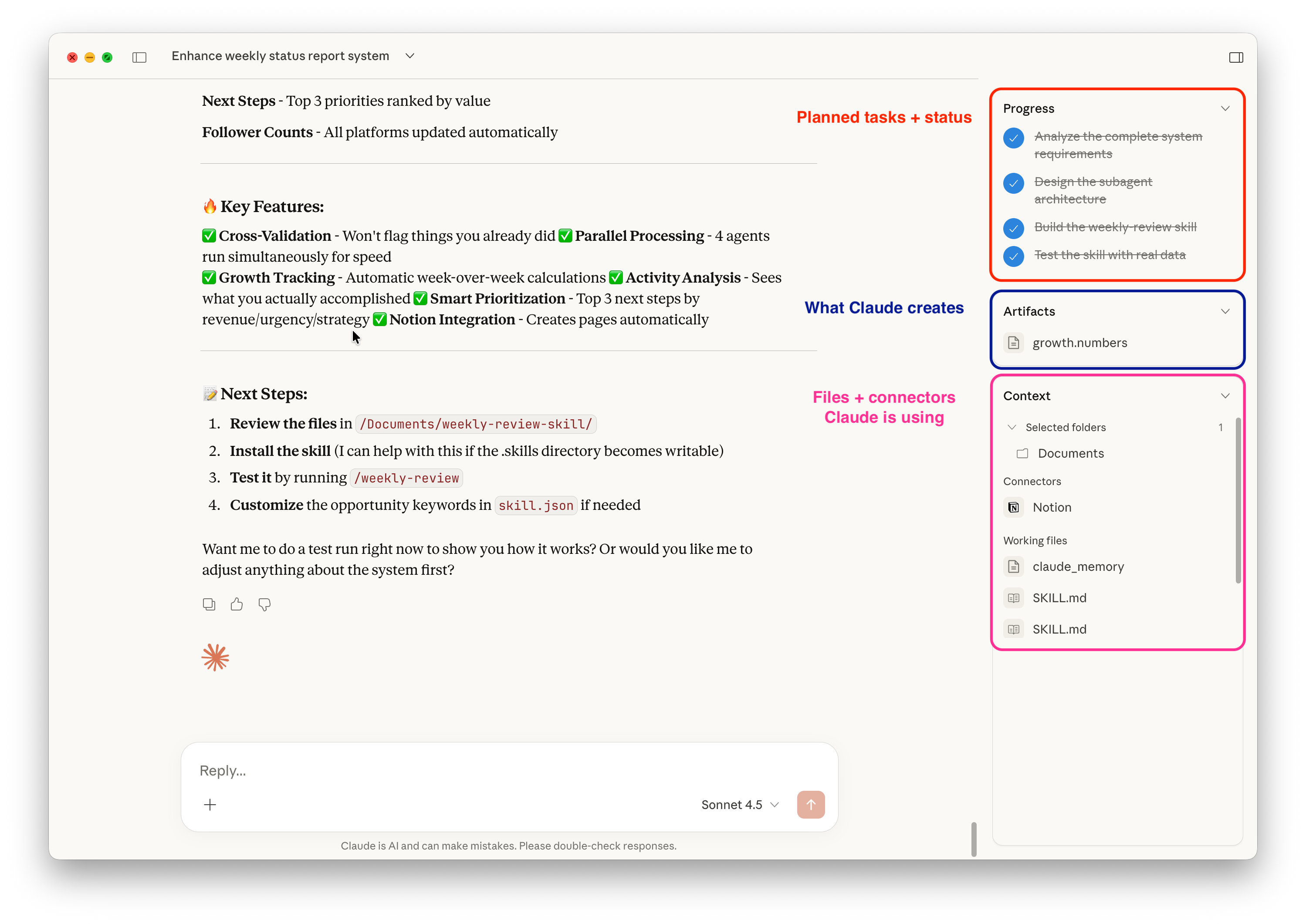
In Cowork, context is explicit: folders, tools, artifacts, and progress are all visible. Work is scoped, tracked, and saved as files you can reuse. You’re reviewing a project in motion.
Coworking with AI
Working with Cowork feels different because it is different. Cowork is a highly capable system where Claude shows up fresh each time and does exactly what the current project scope allows, not a teammate with institutional memory.
Cowork runs each project inside a sandboxed virtual machine (VM). Claude isn’t operating directly on your system. He’s working in an isolated environment with access only to the folders, files, and tools you explicitly grant. That isolation reduces risk, limits unintended spillover, and makes Cowork safer than handing an AI broad system access.
When a project ends, the session context ends with it. Claude doesn’t remember past Cowork projects, prior project plans, or decisions you made last time unless that information lives in files you explicitly give him access to again.
Subagents run with scoped, temporary context per task. They complete their work, hand back outputs to Claude, and return to the pool, ready for the next assignment. This prevents context bleed and improves reliability, but means no automatic long-term recall across sessions unless you resume explicitly or externalize via files.
What this changes for you:
You can’t rely on “Claude remembers how I like this done.” He doesn’t.
Reusability comes from saved artifacts and files, not memory.
Systems must live in files, templates, folders, and documents, not in Claude’s head.
If you want continuity, you need to externalize it with processes and plans saved as docs, templates stored in folders, and standard operating procedures Claude can re-read every time.
Memoryless execution forces systems to live outside the model, which makes them inspectable, reusable, and safer.
Who This is For
You don’t need to be technical. You need to be clear about what success looks like.
This is for people who were curious about Claude Code but didn’t want to live in the command line.
If you understood why Claude Code was powerful but didn’t want to open a CLI, manage a developer environment, or think in terminal commands, Cowork is the unlock. Same execution power. Desktop interface. No coding required.
It’s also for anyone who wants better outputs from AI but is tired of micromanaging every step.
If you’ve ever had a clear idea in your head and then spent 20 back-and-forth messages trying to get an AI to “do it right,” this is for you. Cowork is built for people who think in outcomes, not prompts. You describe the result you want, give access to the right materials, and review finished work instead of stitching pieces together yourself.
Meet Claude’s Team
If you’ve been working with Claude Code, you already know subagents have been valuable. They’re the reason Claude Code can handle complex, multi-step projects without losing track or mixing up context.
Now Claude can use subagents in the Desktop app too. That’s what makes Cowork different from previous versions of Claude.
The evolution looks like this: Claude started as an assistant. You asked, he answered. Then Skills turned him into a competent coworker with specialized knowledge in specific domains. Now Cowork turns him into a project manager with a team of specialists he coordinates.
The Subagent Breakthrough
This isn’t new infrastructure built for Cowork. The subagent architecture has been running Claude Code since July 2025. Cowork brings developer-grade coordination to the Desktop app for everyone, not just developers comfortable in the command line.
You’re not just getting Claude anymore - now he’s got a team of specialists he manages. You don’t assign work to individual agents, you just tell Claude what to do and he decides which specialists to deploy.
Each subagent gets three things:
a specialized system prompt that defines its role and expertise
specific tool permissions that limit what it can access, and
a disposable context window for that specific session.
The difference from single-Claude is coordination capacity. One agent can’t simultaneously research your email, analyze a spreadsheet, review calendar patterns, and synthesize everything into a report without context bleeding. Things get confused. Details from one data source contaminate analysis of another.
How the Team Works Together
With subagents, each specialist focuses on one job with one dataset. They finish, report back, and Claude uses their outputs to coordinate the full task.
Each agent operates in a separate context window, so you don’t get the equivalent of CC spam from their internal decisions. Claude synthesizes their outputs like a team lead running a sync meeting, compiling individual work into a coherent whole. And those disposable sessions mean all the coordination chaos stays hidden. You see the final product, not the messy middle.
Claude’s Report Became a System
When you assign an outcome, Claude breaks it down, deploys the team, and delivers finished work. The organizational chart changed: Claude’s managing a team, and you’re reviewing their work.
Here’s what this looks like when you stop asking for help and start assigning work: Every week, I task Claude with producing a comprehensive intelligence brief covering my growth metrics, calendar activity, key conversations, and inbox status from the past seven days.
Claude breaks that outcome into specialized workstreams, runs them in parallel, and delivers a structured summary. I’m not prompting. I’m delegating.
Here are the specialized agents Claude works with to handle it:
Agent 1: Growth Agent
Tools: Numbers file read, Notion search/write
Job: Review analytics stored in spreadsheet locally, pull last week’s Notion entry, calculate deltas between current and previous metrics, write summary of changes, update follower counts in Notion database
Constraint: Read-only access to Numbers file, write access only to specific Notion database
Agent 2: Activity Agent
Tools: Gmail search, Google Calendar
Job: Search sent emails, list calendar events, summarize what I actually did last week
Constraint: Read-only, cannot send or delete anything
Agent 3: Conversation Intel Agent
Tools: Chat history search
Job: Pull notes from recent chats, search for opportunity keywords, flag missed opportunities
Constraint: Read-only, no external data access
Important clarification: Claude isn’t reading my chat history from Cowork.
My setup works because Claude Desktop continuously writes structured conversation logs to a local notes file on my computer. That file lives on my filesystem like any other document.
In other words, continuity comes from externalized artifacts I control, not from the model retaining context. If it isn’t written to a file and shared as context, Cowork can’t use it.
Agent 4: Email Triage Agent
Tools: Gmail search
Job: Search inbox for unreplied items, flag anything urgent or time-sensitive
Constraint: Search and read only, cannot send or modify emails
Agent 5: Synthesis Agent
Tools: All subagent outputs (read-only), Notion write
Job: Cross-check missed opportunities against sent emails to avoid flagging things I already handled, generate final report combining all inputs, create structured Notion page with findings
Constraint: Write final report only, cannot modify any source data
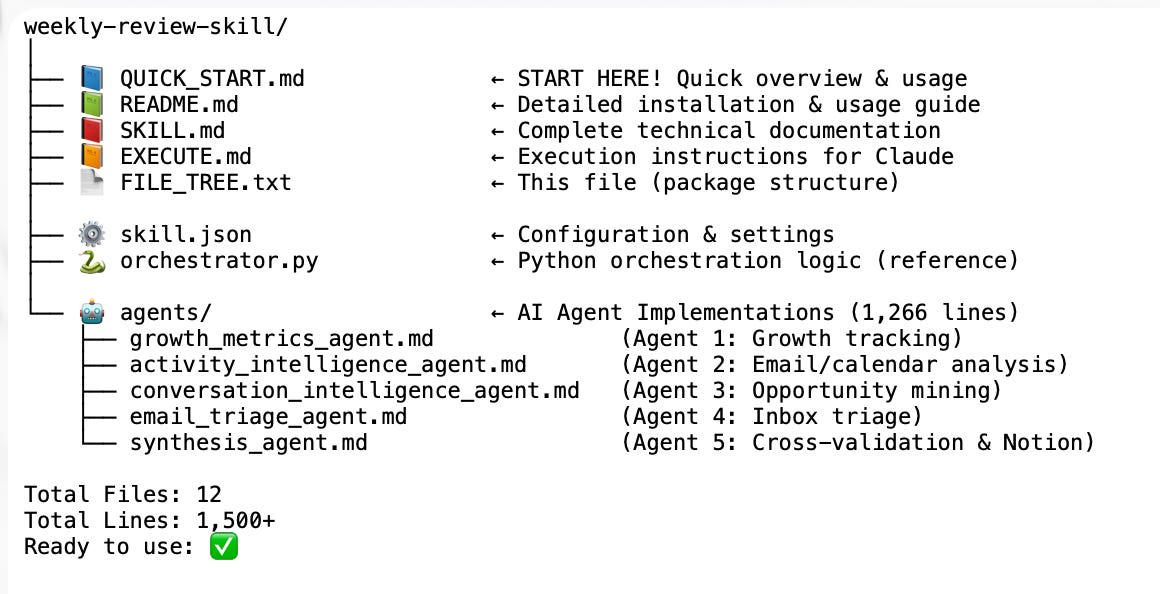
Claude’s skill here isn’t just automation, he’s orchestrating. One instruction from me triggers five parallel workflows managed by five agents I never directly interact with. Each agent has clear scope, specific permissions, and a defined output. Claude coordinates all of it.
Working Safely with Agents
Let’s be real. This technology gives Claude real access, and that means boundaries matter.
When you enable Cowork, you’re giving Claude system-level access to folders you permit, web browsing capabilities, and authorization to use connected tools.
Your job is setting clear boundaries and reviewing what Claude produces.
Risk: Prompt injection from external sites
What can go wrong: Claude can browse the web. A malicious page can try to slip in instructions it shouldn’t follow.
How to prevent it:
Watch the progress tracker while Claude is browsing.
If you see unexpected actions or domains, stop the task immediately.
Keep web-enabled tasks narrow and outcome-specific.
Risk: Incorrect permissions
What can go wrong: An agent might need write access but only has read. Or it has write access where it shouldn’t.
How to prevent it:
Start with the minimum permissions required.
Grant write access only to specific folders or databases, not entire directories.
Adjust permissions after the first run based on what actually failed.
Risk: Agents overlapping or conflicting
What can go wrong: Two agents try to do the same thing, or a synthesis agent misses inputs.
How to prevent it:
Give each agent a single, clearly defined role.
State inputs and outputs explicitly for every agent.
Require an execution plan before Claude starts so conflicts surface early.
Risk: Over-aggressive interpretation of vague instructions
What can go wrong: “Clean this up” can mean more than you intended.
How to prevent it:
Use concrete language: what to modify, what to leave untouched.
Add explicit “do not change” constraints.
Back up files before first-time modification tasks.
Bottom line: Cowork works best when you manage it like a new hire. Clear scope. Tight permissions. Review the work. Expand trust over time.
Why This Matters Now
Most people are still using AI like a brainstorming partner: ask, refine, re-ask, copy, paste, repeat. That model breaks down as soon as the work gets complex. More sources, more steps, more chances for things to go sideways.
Cowork changes the interaction model at the exact moment AI is becoming capable of real execution. Instead of managing turns in a conversation, you’re assigning projects. Instead of relying on memory, you’re building systems that live in files and templates. Instead of asking for advice, you’re reviewing deliverables.
This matters because work is getting more complex. And the people who learn how to delegate to AI systems now will move faster than those still coordinating everything themselves.
The skill isn’t prompting anymore, now it’s about delegation, scope, and ownership.
Start Here
Try assigning Claude a project instead of asking a question.
Pick something you do weekly that involves pulling from multiple sources like a report, a client update, a content review. Break it into subagent roles. Set permissions. Let Claude coordinate.
You’re not the one stitching pieces together anymore. You’re the one checking that the finished work meets the spec.
Start with one subagent workflow and build from there.
Describe the full process to Claude in Cowork. Don’t just say what you want, include info like where the information lives, what you currently do with it, and what the final output should look like.
Tell Claude: “Build a subagent system for this and save it.”
Refine the assignment based on what went wrong. Claude will adjust the specific agent that failed. By the third or fourth iteration, it’ll run reliably.
What’s the first process you’re going to delegate to Claude?

I’m a heavy Claude Code user so I need to find something to work on with Cowork. Very excited to get my hands on it, they opened it to Pro people so fast!
The "assigning projects instead of prompting" shift is real but Cowork's biggest limitation is what you touched on - no persistent memory between sessions. Each new session starts blank.
I went deep on the Code side specifically to solve this. Three-tier memory system (short/weekly/permanent), auto-loaded skills, self-improvement loops. The payoff: my agent runs night shifts autonomously, maintaining context across weeks of work.
The other gap in Cowork: no way to monetize what the agent builds. On the Code side, my agent packages and sells its own templates: https://thoughts.jock.pl/p/my-ai-agent-works-night-shifts-builds