


Your Apple Watch started paying attention to what’s going on around you.
Now it identifies nearby music, recognizes sounds like alarms and doorbells, gives you the ability to rewind part of a conversation and catch what you missed, and even summarizes conversations.
Apple calls this Audio Intelligence, and it moves AI beyond the messages, photos, and notes stored on your devices.
Live Rewind and Siri Recap are planned for beta later in 2026.
So the Watch is getting better at understanding the physical world around it instead of working only with information already sitting inside your apps.
Part of what your Watch picks up is yours, but the rest came from the person sitting across from you who never agreed to any of it. So giving you a way to catch what you missed also requires decisions about what happens to their words, how long that information stays available, and what you can choose to keep.
The Watch is on your wrist, but it’s listening to the room around you. So boundaries have to be built into the system.
The Short Version
Audio Intelligence on Apple Watch Series 12 and Ultra 4 identifies nearby music and recognizes sounds like alarms and doorbells.
Live Rewind retrieves the previous 15 seconds of speech as text and plays a chime to signal activation, even in silent mode. It’s planned for beta later in 2026.
Siri Recap turns conversations into a title, summary, and key points you can revisit later. It’s also planned for beta later in 2026.
The Apple Intelligence Report lists requests your iPhone sent to Private Cloud Compute.
Live Rewind and Siri Recap require Apple Watch Series 12 or Ultra 4 paired with a supported iPhone, with Apple Intelligence and Siri AI enabled.
They’ll start in English, and Siri AI won’t initially be available in the EU. Check Apple’s compatibility list before setting up these features, because their iPhone requirements differ from those for music and sound recognition.
Your Apple Watch Started Listening
Audio Intelligence uses nearby sound and speech to help you understand what is happening around you.
On Apple Watch Series 12 and Ultra 4, that processing starts inside a separate protected area of the S11 chip. Audio stays there briefly while the Watch processes what it hears, without creating a saved audio recording.
Read more: How Apple’s New Hardware Responds to More of What You’re Doing While Keeping Personal Processing Close to the Device

Auto Shazam Names the Song
When music plays nearby, your Watch identifies the song and puts the title and artist into your Smart Stack.
Shazam gets an acoustic signature created from the sound instead of the raw audio, so it matches what’s playing without an actual recording.
Sound Recognition Gets Your Attention
Sound Recognition works locally too. Your Watch listens for things like alarms, sirens, and doorbells, then alerts you when it detects one.
The detection and processing happen on the Watch itself, so the feature keeps working even when your paired iPhone isn’t nearby.
Live Rewind Replays What You Missed
Live Rewind gives you the previous 15 seconds of speech as text, so a sentence you missed during class, part of a conversation, or a line from the television ends up right on your wrist. Once you’ve enabled it, double-press the Digital Crown to bring up the text.
Speech recognition stays on your devices, and Live Rewind creates no saved audio recording.
The Watch temporarily holds nearby audio inside protected hardware, encrypts it, and sends it to the paired iPhone for protected processing.
You can save the text, ask Siri about it, or let it disappear. If you don’t save it or select Ask Siri, it disappears approximately 30 seconds after the display dims. Saving the snippet or selecting Ask Siri sends the text to Private Cloud Compute.
Live Rewind also accounts for the person speaking.
Activating it plays a chime and displays a full-screen animation. And that chime still plays even if silent mode is enabled or you have headphones connected.
So you get what you missed, and the person speaking gets a signal that you retrieved it.
Live Rewind is planned for beta later in 2026.
Siri Takes Notes
Siri learned how to take notes. Now Siri Recap keeps track of what was actually said in a conversation with summaries you can return to later. Turn it on, choose the times and places where it runs, or start and stop it yourself from Control Center.
Once Siri Recap starts, Apple Watch encrypts the audio and sends it to a protected part of your paired iPhone. The iPhone converts the speech into text, shortens it, and sends that shorter version to Private Cloud Compute. Private Cloud Compute writes the recap, sends the result back, and deletes the request after processing.
What comes back is a title, summary, and key points from the conversation.
Siri Recap doesn’t identify individual speakers or label each statement according to who said it, but any names that were mentioned during the conversation might still appear in the recap.
The recap lands in the Siri app on Apple Watch and iPhone, where you can read, edit, delete, save, or export it.
Recaps disappear after seven days unless you save or export them. With iCloud two-factor authentication and a device passcode, results saved in the Siri app sync across your devices with end-to-end encryption.
Siri Recap is planned for beta later in 2026.
Siri AI Got Personal
Siri AI uses your personal context from things like Messages, Mail, Photos, Notes, Calendar, and Reminders. And once Siri starts working with your personal information, you probably want to know where that information is actually going.
Siri AI runs on Apple Intelligence, and it decides which model handles a request based on what you ask it to do.
Apple Intelligence divides that work between your device and Private Cloud Compute:
Smaller tasks use the on-device model and get processed right on your iPhone, so your information never leaves the device.
More complex requests need a larger model, so Apple Intelligence sends them to Private Cloud Compute.
When Apple Intelligence needs a larger model, your iPhone encrypts the request and sends it to a Private Cloud Compute server.
The server decrypts the request, processes it, returns the response to your iPhone, and deletes the request data afterward.
Your device verifies the software running on the server before sending the request. Apple can’t read the contents of Private Cloud Compute requests, and independent researchers are able to inspect the software running on those servers.
Information you deliberately save remains on your devices according to the feature and storage choices you make.
Read more: How iOS 27 Uses Siri AI, Shortcuts, Safari, Passwords, and Photos to Find, Check, Secure, and Edit

Set the Model Inside Shortcuts
Shortcuts lets you decide which model handles the request in a task, so if you want to control which model gets used, set one up with a Use Model action.
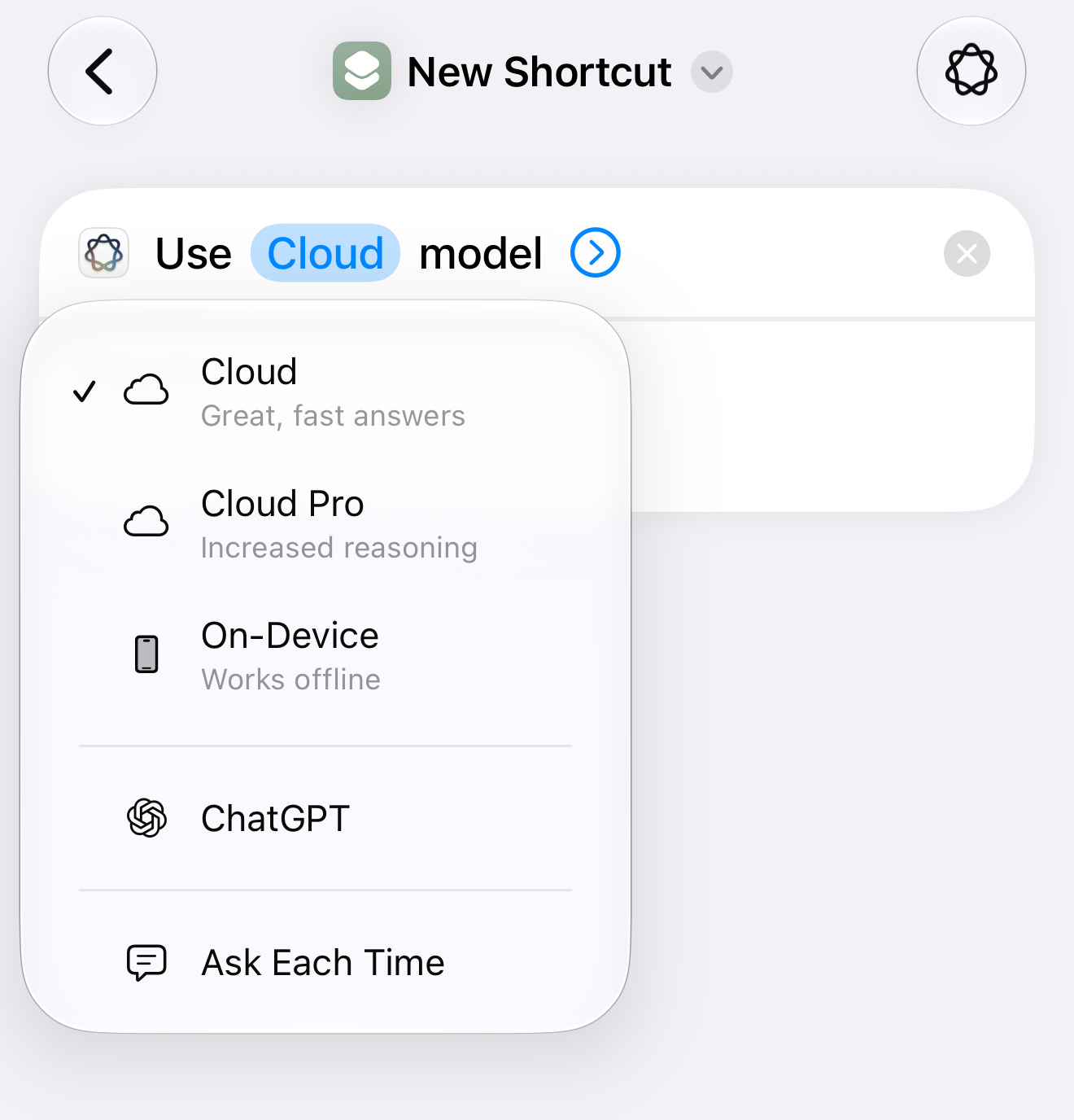
The Use Model action includes:
On-Device only works with text and processes requests on your device without an internet connection.
Cloud and Cloud Pro use Private Cloud Compute.
ChatGPT sends that request to OpenAI.
Ask Each Time lets you decide which model to use when you run the shortcut.
So if you’re building automations around private information, the model selection is part of the setup. The model you select in the Use Model action determines which system receives that request.
This setting doesn’t change how Siri Recap processes conversations.
Check Siri’s Work
Now Siri works with information from your apps, Apple Intelligence decides whether a request stays on your device or goes to Private Cloud Compute, and you get the receipts.
The Apple Intelligence Report gives you a record of the requests your iPhone sent to Private Cloud Compute.
Go to Settings > Privacy & Security > Apple Intelligence Report and export the activity report for your iPhone.
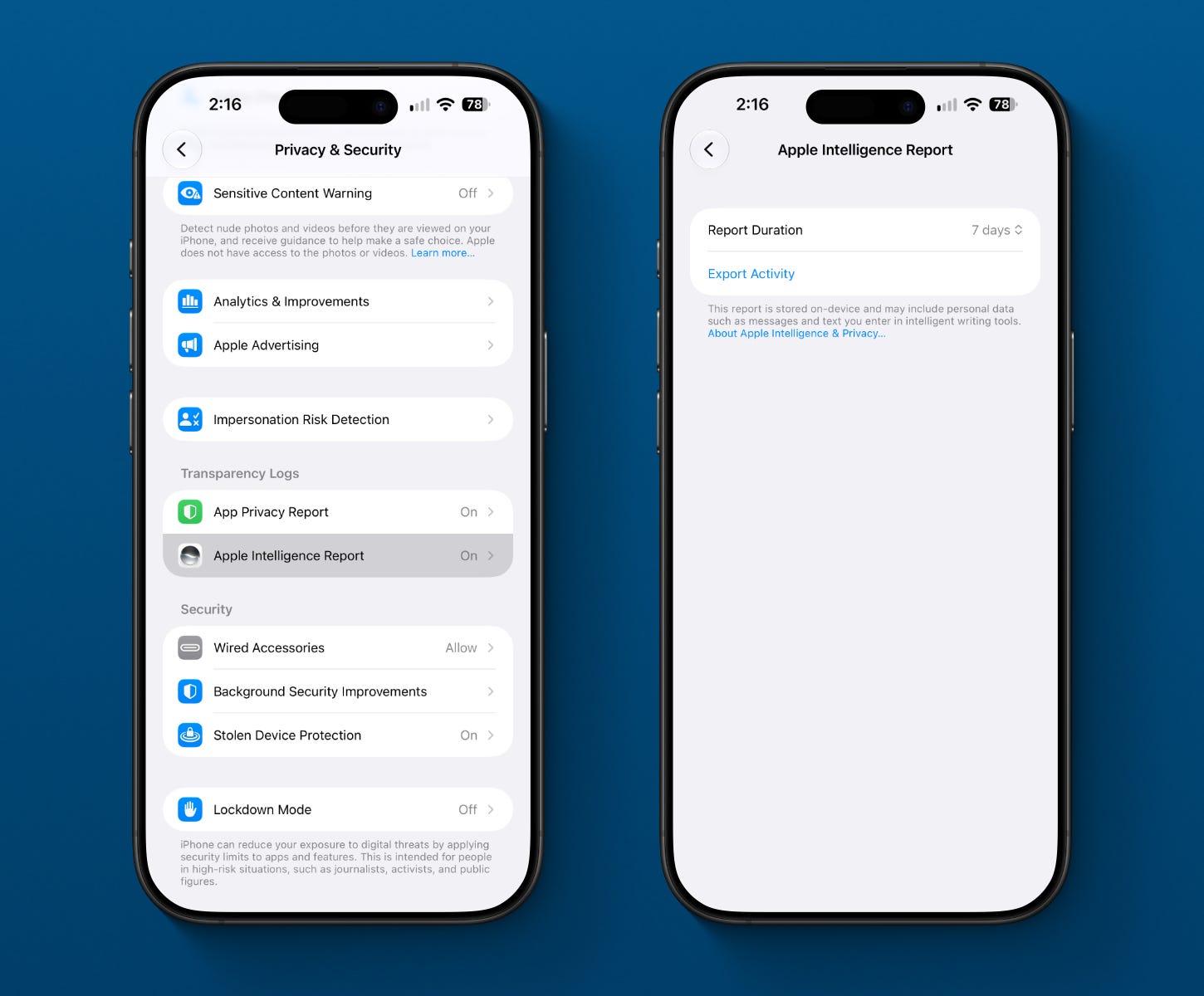
Then open the downloaded file (Apple_Intelligence_Report.json) with a text reader to inspect the requests.
So before you worry about Siri sharing your secrets, check which requests even left your phone in the first place and see where it’s actually processing your data.
Your Watch Needs Boundaries
Your AI already works with messages, photos, calendars, notes, and reminders. Apple Watch brings more of the physical world into that same system by working with sounds and conversations around you.
Live Rewind and Siri Recap stay off until you turn them on, and once they’re running, the audio gets processed and deleted while the text expires unless you decide to keep it.
And because the Watch hears other people in the room, Apple built its boundaries around what happens to their words.
Live Rewind plays a chime to signal that you retrieved recent speech, but it doesn’t guarantee that everyone nearby heard it, understood it, or agreed to it.
The person standing next to you still deserves to know when their words become part of your technology.
How many seconds before the first two party state lawsuit. Given CA is one of those states I'm surprised this got past the Apple Lawyers.
V