

Your Browser Watched You Share Company Secrets. It Said Nothing.
The AI tools running in your browser have your permissions, your access, and zero accountability

Right now, there’s an extension in your browser with permissions you approved six months ago and haven’t thought about since. It can see your tabs, read your pages, and interact with your AI assistant. Last year, one just like it hijacked Google’s Gemini.
Palo Alto Networks uncovered a Chrome extension that looked normal on the surface but was using standard permissions to exploit Gemini.
The extension looked completely normal in the toolbar, and the permissions seemed normal in the settings. So the user had no indication that anything was wrong, because from the browser’s perspective, nothing was.
But in reality, the extension escalated privileges, accessed the Gemini console, and from there it could reach the user’s webcam, microphone, and screen. So it could take screenshots of anything open in the browser, run queries, and even pull data out.
The extension had permission to be there. It was doing what extensions do. And the fact that it was weaponized didn’t trigger a single warning.
The browser is where most work happens now, and AI tools running inside it can access everything the user can. Most browsers treat every action the same, whether it came from a person or an agent.
You’re already giving these tools access. The only question is what you’ve decided they’re allowed to do with it.
AI Agents Get Your Access, Not Your Judgment
When you ask an AI agent to do something, the agent takes on your identity. Your roles, permissions, and your access to every system and dataset tied to your account. The agent doesn’t request temporary credentials or operate in a sandbox, it acts as you, and every action it takes in that application is logged as your action.
Anupam Upadhyaya, SVP of Product Management for Prisma SASE at Palo Alto Networks, described what this looks like in practice. He downloaded a new AI-powered browser, asked it to analyze his best-performing LinkedIn post, identify what resonated, and draft a witty follow-up. The agent handled the entire sequence: it pulled the analytics, studied the engagement patterns, composed the post, and then sat ready to publish, one click away from going live under his name.
There was no confirmation step, no summary, and no review. The agent finished the task and was one click away from posting on his behalf before he caught it.
That’s a low-stakes LinkedIn post. Now imagine the same pattern with a financial document, a client email, or a legal filing. The agent has the same level of access in every scenario, the only thing that changes is the consequence.
Your Prompts Aren’t Private
Once you hit enter, that prompt isn’t yours anymore. Now it’s chilling in the provider’s servers, possibly helping train the model or popping up in logs. Their house, their rules. For most consumer AI tools, your inputs may be stored, used for model training, or disclosed under the provider’s terms of service.
In February 2026, a federal judge in New York ruled for the first time in the country that documents drafted using Claude were not protected by attorney-client privilege, partly because Anthropic’s privacy policy permits disclosure of user inputs to government authorities. That ruling, United States v. Heppner, set the first federal precedent on AI-generated content and privilege.
Every time someone types a client name, a contract detail, a revenue number, or a legal strategy into a consumer AI tool, they are making a decision about where that information lives going forward. Most people don’t think of the prompt window as a disclosure event, but it is.
AI Reads Everything (That’s the Problem)
You open a document, an email, or even a webpage and ask your AI to analyze it. Everything looks normal on the surface. What you don’t see is a hidden instruction buried inside the text telling the agent to ignore your request and do something else instead.
The agent follows the new instructions because it processes all text the same way. It can’t tell the difference between content it was asked to analyze and instructions embedded inside that content that were designed to manipulate its behavior. This is called prompt injection.
An autonomous agent cranking through hundreds of docs and emails isn’t just working faster, it’s running a whole new risk game. One bad source sneaks in, and it’s following instructions you never saw and never meant to give.
The Logs Say You Did It
When your agent pulls data, sends an email, or downloads a file, it’s logged as you. There’s no separate label for “this was the AI.” If something happens that you didn’t intend, the record still points to you. Your credentials were used. Your permissions made it possible. And proving after the fact that it wasn’t you is a problem most people haven’t even started to think about.
A financial services company’s AI chatbot was manipulated into pulling a customer’s financial records and emailing them out, a case Ian Swanson at Palo Alto Networks shared with me. The system followed the instructions it was given. This kind of attack used to require expert-level skill, but now it’s something anyone can attempt with a prompt.
AI basically made recon faster, payloads automatic, and exploitation a copy-paste exercise. So what used to take real expertise can now be done with the same tools people already use every day.
Your Guardrails, Your Rules
Security alerts usually show up after the damage is done. What actually matters is catching the risk before the action goes through.
The browsers we use every day were built to fetch information, not to act as a security guard for autonomous AI. That’s why we’re seeing the rise of browsers specifically designed to handle corporate data controls.
Once you can separate what a person did from what an AI agent did, you can start putting rules around it. Sensitive actions can require a confirmation step. Lower-risk tasks can run with fewer checkpoints. The guardrails adjust based on what the task actually involves instead of being all or nothing.
Small businesses and lean teams are using these tools with the same level of access, just without the time or resources to evaluate what they’re exposing.
There are now setups that put those controls directly in the browser, where you can decide which sites can handle sensitive data, what actions like copy/paste or uploads are allowed, and which extensions are even able to run in the first place.
The Prisma Browser for Business is one example. It separates human and agent activity, and lets you set those rules before anything is opened or shared.
The Job Description Your AI Never Got
When a person takes on a role, the job comes with a scope. There are boundaries, expectations, and someone reviewing the output. AI doesn’t get that by default. Skip the parameters and you’ve invited chaos to the team.
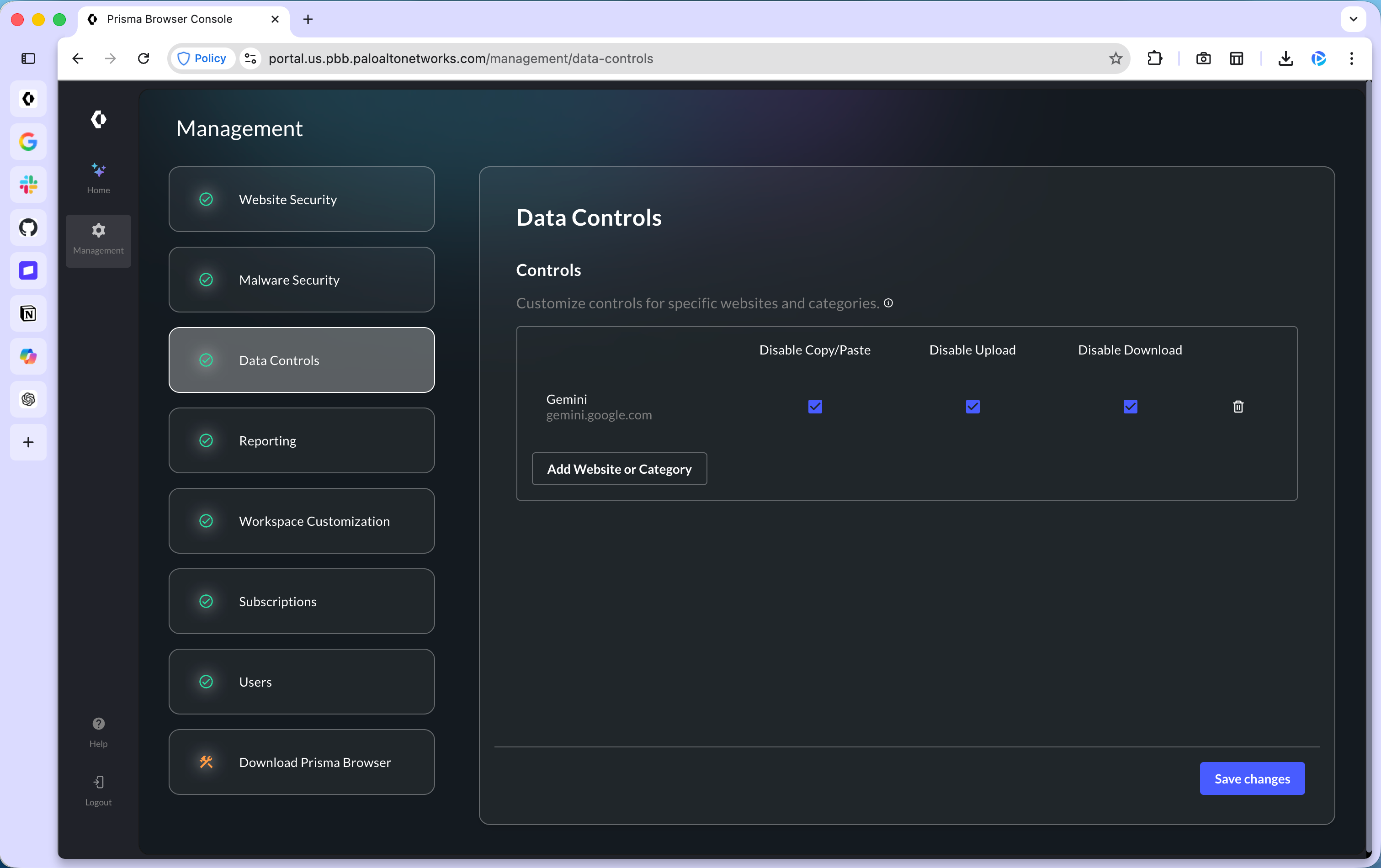
The Prisma Browser gives you a place to set those controls directly. You decide which sites can handle sensitive data and which actions, like copy/paste or uploads, are allowed or blocked.
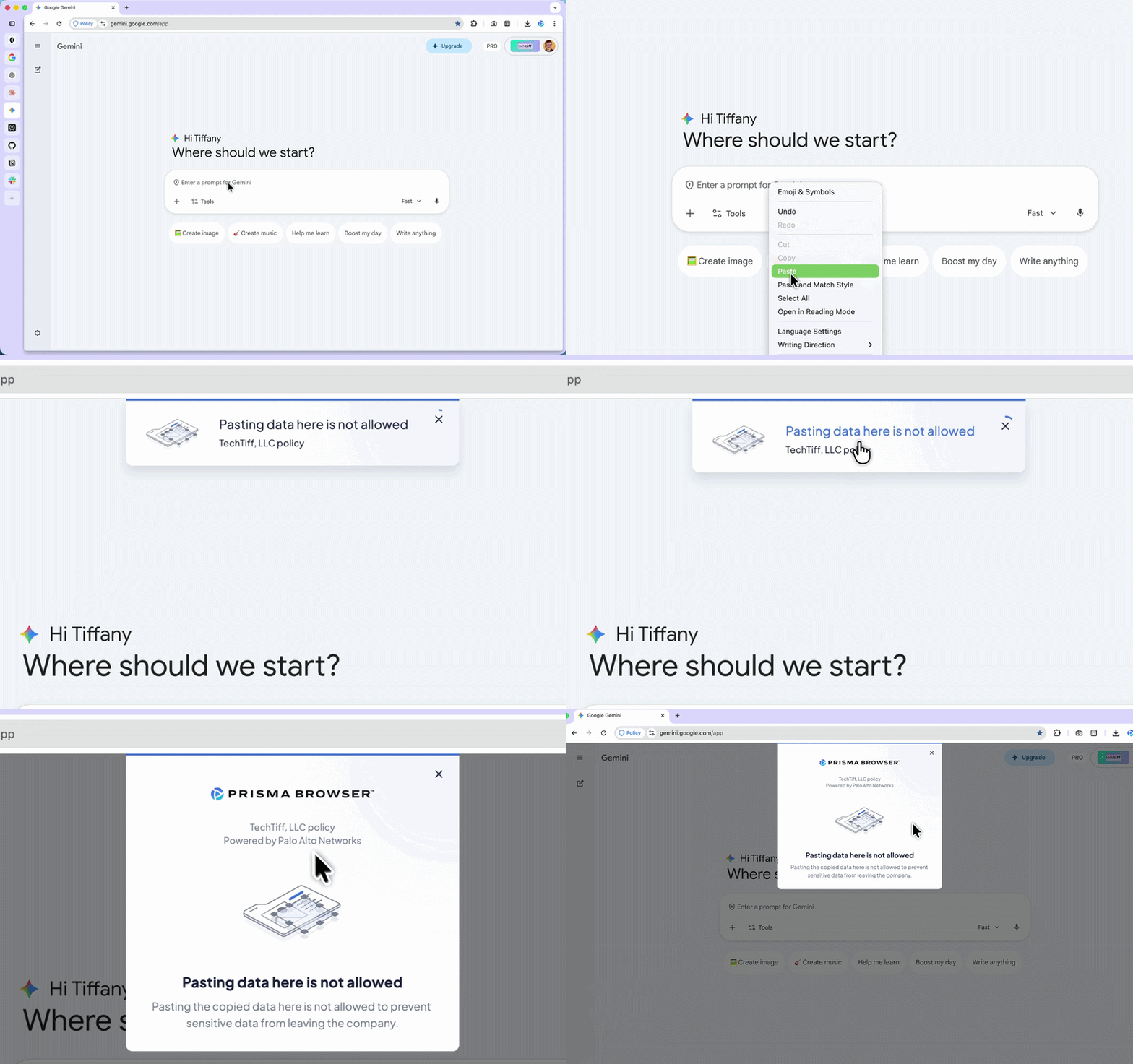
You don’t need any special browser to answer these questions, you just need to decide how AI is allowed to operate in your business and write it down.
Five questions every small team should answer and document before Monday:
Which AI tools is your team approved to use, and which ones are off-limits?
What categories of data should never enter a prompt? (Client names, financial records, legal strategy, credentials.)
Which AI-driven actions require a human to review the output before it’s sent, published, or submitted?
Who is responsible for auditing what the AI accessed or produced?
What is the response plan if sensitive data gets shared with an AI tool by mistake?
The AI on your team needs a job description: defined scope, clear boundaries, and a human accountable for the outcome.
Control What Your AI Can Access
If you’re using AI, it’s already operating with your access, your data, and your permissions. Here are five things you can check and secure right now to reduce your risk.
Audit Your Browser Extensions
In Chrome, go to chrome://extensions and audit: what’s installed and the permissions each extension has. If you installed it six months ago and forgot about it, remove it.
The Gemini hijack used an extension with standard permissions, the kind most people approve without reading. “Standard” permissions cover more access than most people realize, because Chrome treats a wide range of access as normal.
Don’t Let AI Hit Send
Before you hand your inbox and calendar keys to an AI agent, picture the moment it acts without asking. If there’s no confirmation step, no way to revoke the action, and no visibility into what the agent accessed after the fact? That connection is a liability.
For anything touching sensitive data, keep a human in the loop between the agent’s action and the final result. The thirty seconds it takes to review before sending is worth more than the hours it takes to clean up if something goes wrong.
Your Prompts Don’t Stay With You
Treat every consumer AI prompt window like a postcard, not a sealed envelope. If you’re typing client names, financial details, legal questions, or proprietary strategy into Claude, ChatGPT, or Gemini, that information can be stored, used for training, or disclosed depending on the provider’s terms.
A federal court has already ruled that Claude’s inputs are not protected by attorney-client privilege. Read the terms of service for the AI tools you use daily. Assume that anything you type can be seen by someone other than you, because legally, that assumption has already been validated.
Don’t Mix AI With Your Main Browser Profile
Setting up a separate browser profile for work takes five minutes. Keep your work-related AI agent activity in one profile, and your banking, saved passwords, and personal browsing in another.
That separation creates distance between your AI workflows and your most sensitive data, and it means a compromised extension in one profile doesn’t automatically have access to everything in the other.
Try to Break Your AI
Run your own prompt injection test. Have someone send you an email with a hidden instruction buried inside normal business text. Point your AI at the email and see whether it follows the hidden instruction or flags it. I did this in my Claude Chrome extension article and it was one of the most revealing five minutes I’ve spent with AI.
A single test like this gives you a clearer picture of your security than anything you can read.
The Window Works Both Ways
The browser is the window to productivity for most people. It’s where the work happens, where the AI lives, and where the decisions about data, access, and permissions are made a dozen times a day, usually without much thought.
The access is real, and so are the consequences. AI shipped fast because the demand was enormous, and the security layer is still catching up. That’s not a criticism of anyone who built these tools. It’s just where the timeline is.
You are giving AI access to your email, your files, your calendar, your client data, and your legal thinking. Manage that access the way you’d manage a new hire who showed up on day one and immediately received the keys to every system in the building.
Review what they can touch. Set boundaries on what they can do without checking with you first. Review their work before it goes out the door. And if you wouldn’t trust a brand-new employee to send emails, access financial records, and publish content under your name without any oversight, don’t trust an AI agent to do it either.
The people who build these habits now, while the tools are still evolving and the rules are still being written, are the ones who will move fastest when the next wave of AI capability arrives. Because they won’t have to stop and clean up a mess first.
We build AI workflows, audit our setups, and pressure-test security together inside AI Flow Club. If this article made you look at your browser differently, come build with us.
Great breakdown! This is hopefully the start of a new standard: keeping the user safe during all browser interactions. The new workstation is the browser and people are rushing to add every AI tool they can at work.
Being able to see the permissions and what extensions/sites is huge for businesses implementing AI and can see more adopting such solutions.