

AI Answered the Call
How PwC and OpenAI are building AI support agents that understand the problem and get to work

I called ChatGPT about a video I was editing and it pulled its cursor up and got to work while I talked.
The project had unlinked media, so I told ChatGPT what was wrong.

It inspected the project, matched the right media, and deleted them while we talked.
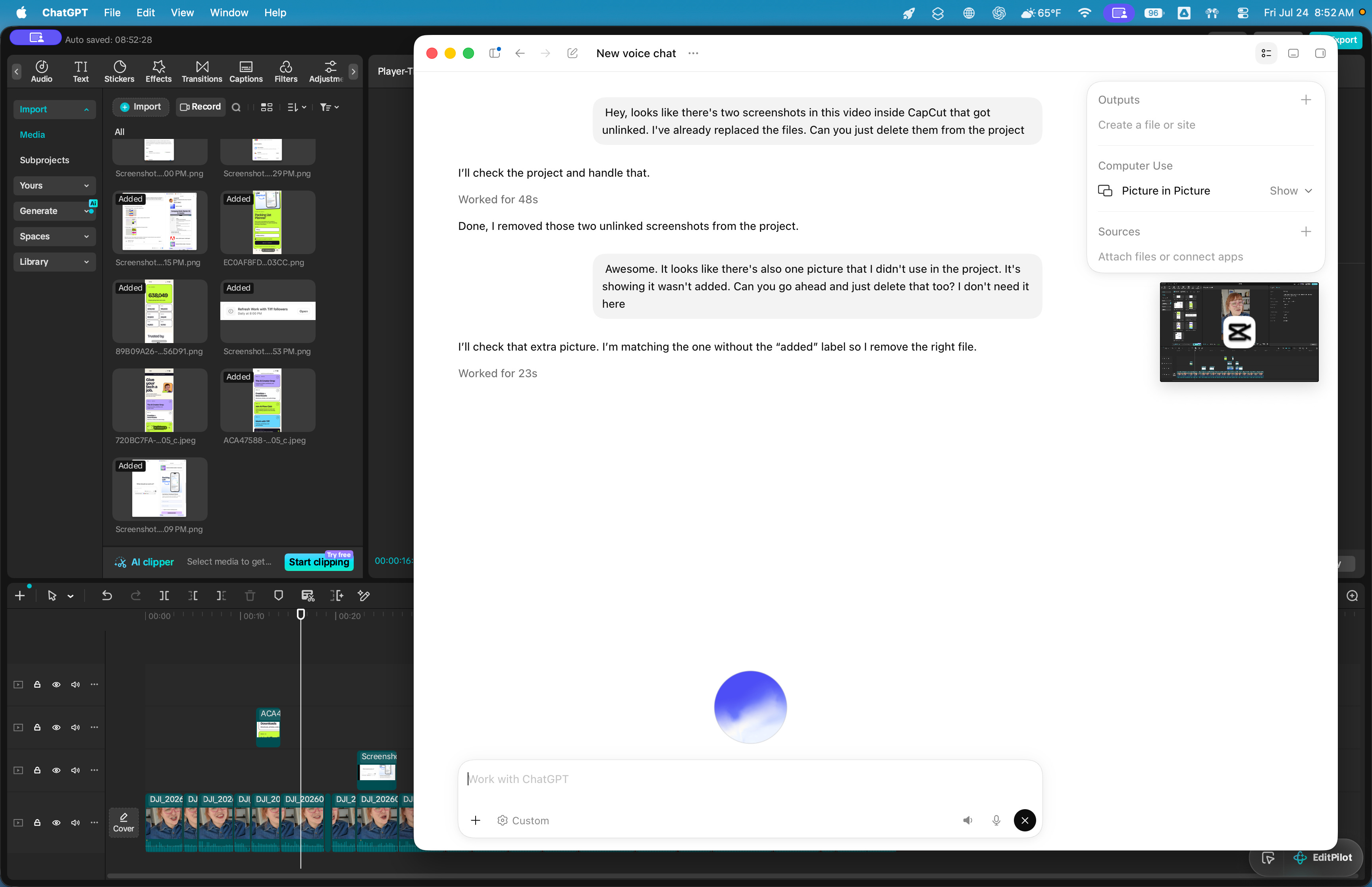
That’s ChatGPT Voice, the live voice experience OpenAI brought to Work and Codex in the ChatGPT desktop app. You can start work, check progress, find blockers, and redirect tasks without stopping to type.
Customer support is starting to work this way too. You explain what happened, show the system a photo, screenshot, or video, and give it the information it needs to act or bring in a person.
The process is the same: describe the problem, show context, give the system access to the right information, and tell it when to act or escalate.
I talked with Ian Kahn, PwC’s Customer and Commercial Excellence Platform Leader, about how PwC and OpenAI are building that experience into customer service. The pattern is closer to what happened on my laptop than you might expect.
The Short Version
ChatGPT Voice turns one conversation into a way to start tasks, check progress, redirect work, and coordinate agents across connected apps.
Multimodal customer service combines voice, photos, video, screenshots, company information, and support history in one troubleshooting conversation.
AI-powered support gathers evidence, handles routine actions, and brings in an employee with the context intact when judgment or authority is required.
The workforce dividend gives employees more time for complicated customers, better ideas, and projects that repetitive work previously pushed aside.
Meet Customers Where They Are
People are already using AI to shop. They ask it to research products, compare prices, explain the differences between models, summarize reviews, and recommend an option based on their budget or specific needs.
So the customer journey is starting before someone ever reaches a company’s website. AI assistants help people identify products, compare them with alternatives, and decide where to make the purchase. Support is a continuation of that experience.
After the purchase, you can use AI to understand the instructions, troubleshoot a problem, check a photo for an installation mistake, or identify a broken part.
That gives customers faster answers and gives employees more time for the conversations that actually require their attention.
Customer Service Got a Smarter Assistant
PwC calls the intelligence layer behind this a commercial brain. Its agents sense what is happening, analyze the customer context, and start the next best action based on where someone is in the journey.
Now AI customer service agents look at what you share, listen to your explanation, and handle the work attached to it. Voice, images, video, text, and action become part of the same conversation.
If the issue requires a person’s judgment or decision, it sends the conversation to an employee.
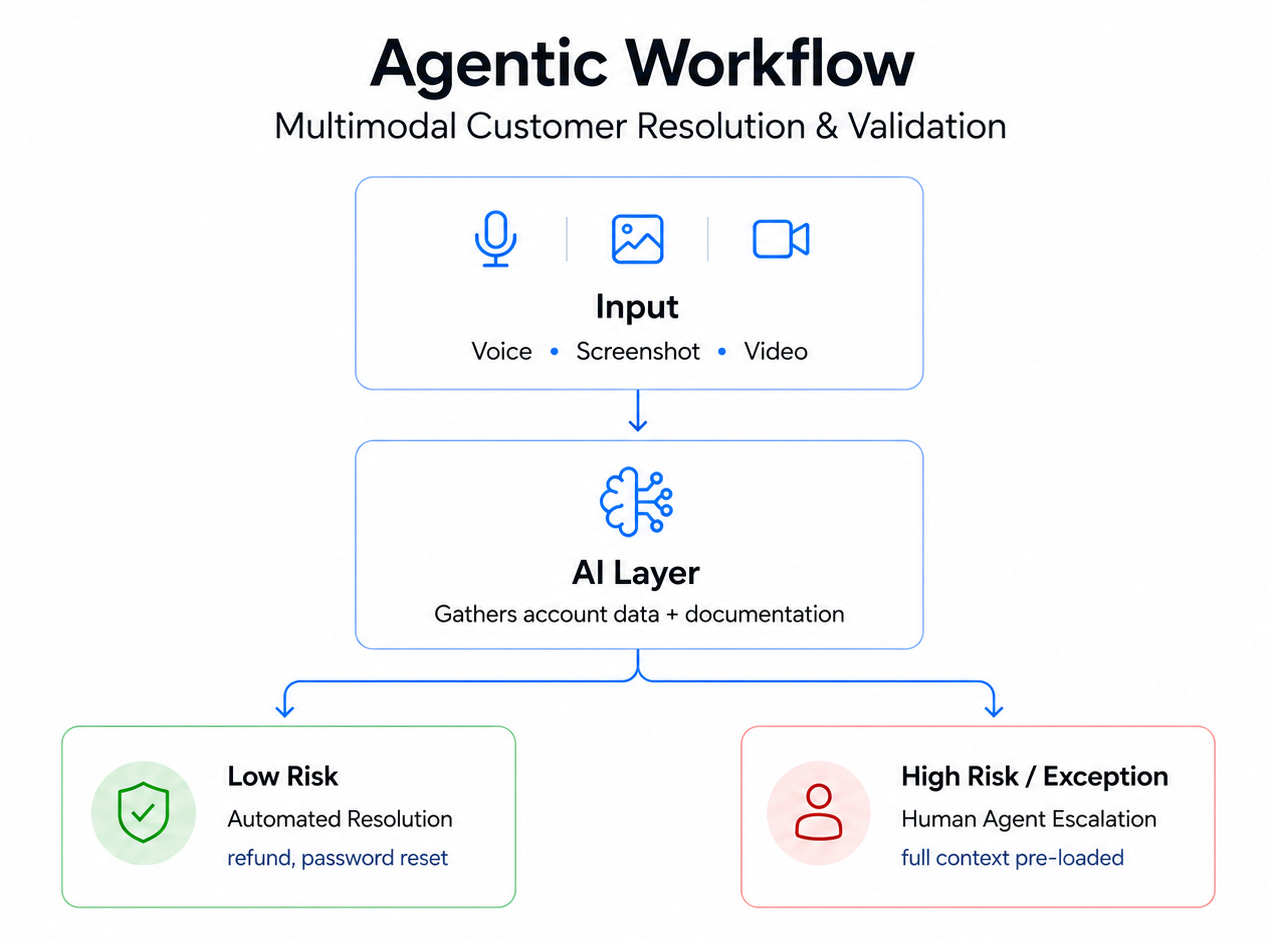
So customers get help based on what the system observes and the information the company already has. And employees regain time to investigate unusual problems, make decisions, and have conversations that fall outside the usual script.
AI handles part of the work, and people reinvest the time into the projects, ideas, and conversations they previously could not reach.
The Airline Connects the Journey
A large airline is partnering with PwC to redesign its commercial and customer-care operations across voice, digital, and mobile channels. The work covers common discovery, buying, and service needs, with the goal of creating one connected experience across every channel.
The goal is an end-to-end view of the customer journey that reduces the need to redirect someone to a website or transfer them to a live agent.
One system tracks what a customer wants whether they’re comparing flights, finishing a booking, or dealing with a delay, and it has that same information whether they’re in the app, on the website, or on the phone.
For example, imagine you start changing a delayed flight in the airline’s app but need help before you finish. When you call, the agent can see what you were trying to do and where you stopped, so you don’t have to explain it from the beginning. The channel changes, but the context comes with you.
The program follows a pilot-prove-to-scale approach. PwC and the airline test and validate outcomes methodically before expanding AI into additional customer journeys.
AI Handles What It Can
Kahn told me that PwC’s work with OpenAI on contact centers has enabled customers to resolve 30 to 50% of their questions through self-service instead of employee-assisted support.
Routine support requests reach an answer without waiting for an employee, and the support team gets more time for complicated cases.
Kahn described service as a mix of high-volume routine transactions and “moments that matter” tied to customer retention, growth, and satisfaction. When AI handles more of the routine volume, employees can spend more time on interactions that require judgment and working directly with the customer to reach the right outcome.
That could include actions a company has already defined and approved. For example, an AI system might process a refund below a set amount or guide someone through a password reset. The company sets the limits. When a request falls outside them or requires judgment, the system hands the customer and the full context to a person.
When they pick it up, they get the whole conversation already collected, so you don’t have to explain the problem again from the beginning.
Validation stays part of the process before anything big happens. A large refund, a canceled order, anything hard to undo gets a check before it’s final, the same way you’d want a second pair of eyes on anything that’s hard to reverse.
Start With One Journey
For a small online shop, that first journey might be handling a damaged order. A customer sends a photo, the system finds the order and return policy, then either offers an approved replacement or brings you in when the request falls outside the rules.
Pick one process that customers or employees already use, then redesign it around the outcome you want.
Pick one customer journey or business process.
Look for a process that happens frequently, follows a recognizable pattern, and currently takes more time than it should.
Define the outcome and how you will measure it.
Decide what the new process should accomplish before choosing the technology. Choose a few measurements that will tell you whether the new system is actually helping.
Redesign the process with AI included from the beginning.
Walk through the process again and decide how it should operate now that AI can read, listen, look at images and video, search information, and take approved actions.
Build validation into the workflow.
Decide which answers and actions the AI can handle independently and which ones require review.
Confirm that the data is reliable.
Review what the AI will use, remove outdated information, and decide which source wins when two records disagree.
I built the context layer behind this system in The AI Employee Handbook, where a Company Brain gives people and AI one shared record of how the business operates.Include and train every affected team.
Map out who will use the system, receive its work, review its decisions, or handle exceptions.
Prove the journey before expanding it.
Refine the workflow until it consistently reaches the intended outcome, then apply the same approach to another process.

AI technology can improve faster than people develop confidence in it, learn the new process, agree on the rules, and change their operating habits.
Ian said the biggest surprise has been the amount of time required to educate people, build confidence, and bring the organization through the change. He recommends finding the people already using AI effectively, treating them as change champions, and turning their existing practices into training and workflows the rest of the organization can use.
Give the Time Another Job
AI creates capacity. What a company does with that capacity is a choice. PwC’s research says you should name the growth opportunity before measuring the capacity AI actually creates, then redesign and re-skill the workforce around that opportunity. Skip the order, and the result is a smaller team doing the same work.
“There’s a big unlock there for organizations to start thinking differently about service, less as a cost center and more as a growth edge.”
Ian Kahn, PwC
When AI handles the repetitive questions and the routine lookups, a person gets room to actually investigate a hard case, make a judgment call, and find an answer the standard script never covered.
The next time AI frees up an hour, put it to work on purpose.
Pick one task you repeat every week that’s pulling time away from a project you actually care about. Set up an AI system or automation to handle a defined piece of that task, and give it what it needs to actually complete it, your account info, your templates, your standard responses.
Treat it the way you’d treat a new hire on their first week, with clear instructions and enough context to act without guessing.
Add a check before anything it produces goes out the door, the same validation step PwC builds into an airline’s rollout before letting it touch every customer. Then decide, on purpose, what the recovered time goes toward, the project sitting in your drafts folder, the offer you’ve wanted to build, the idea you keep meaning to test but never quite get to.
In the next AI Office workshop, we’ll organize your Notion workspace so AI can use your projects, processes, decisions, and reference material without you digging for context every time.